 Verbamor
Preply's Lesson Insights don't cover your language. Here's what your lesson leaves behind anyway.
Preply's Lesson Insights only cover English lessons, so if you're learning Spanish, French, Italian, Portuguese, Russian or German there, the vocabulary review is yours to run. Your lesson leaves a Vocabulary tab, a Notes tab and a saved chat log; the whiteboard is gone. Spend 25 minutes tonight turning them into about 10 cards.
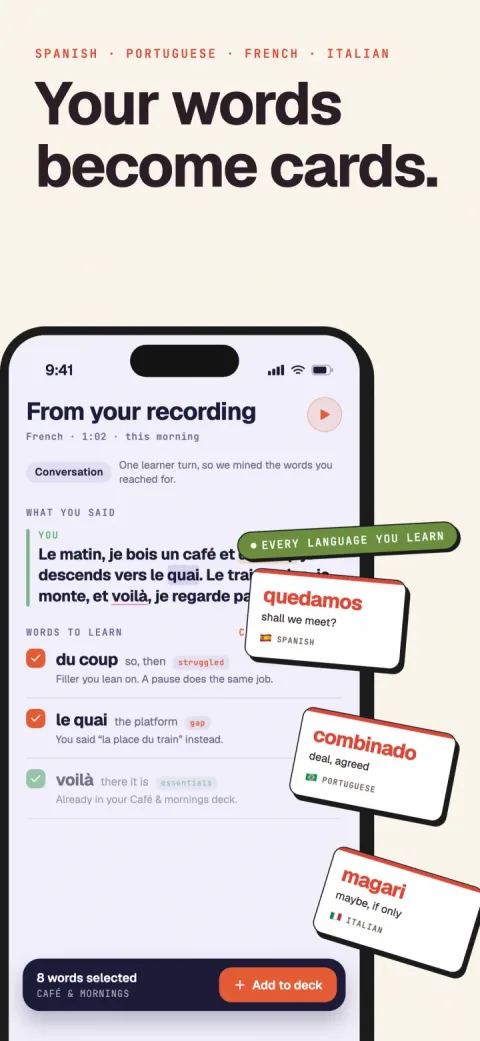
Verbamor turns the words from your own lessons and recordings into flashcards, and brings each one back before you’d forget it.

Preply's Lesson Insights are, in Preply's own words, "only available for English lessons." If you're learning Spanish, French, Italian, Portuguese, Russian or German there, the vocabulary review is yours to run.
Your Spanish lesson ended 4 minutes ago. You got the subjunctive wrong, your tutor fixed it, you typed the fix into the chat, and for a minute there you had it.
Tomorrow you'll remember that it was something about the subjunctive.
Preply's answer to forgetting is Lesson Insights: AI summaries with "personalized feedback on vocabulary, grammar, and speaking," landing 5 minutes before the lesson ends.
Preply's help centre says this, on the learner article and the tutor one: "Currently, Lesson Insights are only available for English lessons."
So if you're learning English on Preply, close this tab and go switch Insights on. Settings, then Permissions. It's free, and the feedback reaches you before you've left the classroom.
For everyone else Lesson Insights don't exist, though the guides answering "Preply lesson vocabulary review" describe them as though they covered every language.
Preply Classroom holds a Vocabulary section and a Notes section in the bottom navigation bar, and "messages sent during your lesson will be saved so you can review them later."
The whiteboard isn't on that list. Preply is blunt: "students cannot access the whiteboard after the lesson." Whatever your tutor drew died when you closed the tab.
Vocabulary, Notes and the chat log are your raw material. Here's what to do with them before bed.
Do Preply's Lesson Insights cover languages other than English?
Lesson Insights cover no language but English. Preply's own help centre says so, in one sentence, twice: "Currently, Lesson Insights are only available for English lessons."
So if tonight's lesson was Spanish, French, Italian, Portuguese, Russian or German, the feature you've been reading about all week didn't run. There's no summary waiting for you. There never was one.
What Lesson Insights do when they do run, in Preply's words: "Lesson Insights are AI-generated lesson summaries that provide personalized feedback on vocabulary, grammar, and speaking, along with tailored exercise suggestions." Built from audio: "We generate Lesson Insights by transcribing the audio from your lessons and then extracting the insights."
The Lesson Insights delivery is genuinely good. Insights appear "5 minutes before the lesson ends, in the classroom", again when you leave, and again in chat within 5 minutes of the hour finishing. Feedback on your vocabulary before your tutor has said goodbye.
You're learning English on Preply
Turn Lesson Insights on and close this page. It's in the platform, it costs nothing on top of your lessons, and it hands you vocabulary and grammar feedback 5 minutes before the lesson ends. Open Settings, click Permissions, save (the onboarding prompt is worded "Turn on Lesson Insights", so it's hard to miss).
Everyone else: the rest of this page is the vocabulary step you now have to run yourself.
Preply deserves credit for one thing, though. You can switch recording on alone, without your tutor. Preply: "If your tutor doesn't enable them but you do, you will still receive insights. Your tutor's audio won't be recorded or analyzed."
On italki, both parties have to agree or nothing is recorded at all. One teacher who never got round to the toggle, and your lesson leaves no trace.
The italki comparison makes the English-only limit sting. The consent model is built for a learner acting alone, and then the feature won't cover your language.
What you actually keep after a Preply lesson
Open Preply Classroom tonight and look at the bottom of the screen. Two words there hold everything you still own: Vocabulary and Notes.
Preply's student guide, updated 17 December 2025, puts Vocabulary and Notes there: "You can access the Vocabulary and Notes sections in the bottom navigation bar of Preply Classroom menu." It promises the lot stays put. "Your homework, vocabulary, files and notes are all in one place; you'll never lose them!"
The lesson chat survives too: "Messages sent during your lesson will be saved so you can review them later." I'd copy anything you care about out of there anyway.
Now the part that stings. The whiteboard is gone. One line, same guide: "Please note, students cannot access the whiteboard after the lesson."
Every conjugation table your tutor drew on the whiteboard went when you closed the tab. If that's where your tutor does the explaining, the richest hour of your week left no trace.
Lesson audio is the last item, and I'll be careful with it. Preply publishes 2 sentences. "You can access your lesson audio for as long as you're using Preply." And: "You can also download the audio at any time."
Both audio sentences sit in the Lesson Insights help article, dated 16 July 2026: turn Insights on, and "we will transcribe your lessons". The same article says, flatly, "Currently, Lesson Insights are only available for English lessons."
So the download is documented for the lessons that feature covers. For a Spanish or Russian lesson, whether audio exists at all is undocumented, and I won't guess for you.
Go and look at your own Preply settings. That article, read on 9 September 2026, gives the route in 5 words: "Open Settings and click Permissions."
If audio is offered, take it, and turn it into a transcript. If nothing is offered, you've learned that before building a Tuesday routine around a file that was never coming.
The honest inventory for a Spanish, French, Italian, Portuguese, Russian or German learner: a Vocabulary tab, a Notes tab, a saved chat log, and a whiteboard you'll never see again. All of it text that you or your tutor typed.
Start with Notes tonight, not Friday. Copy the whole pane into a plain text file, date it, and add the 2 or 3 things your tutor said out loud that nobody typed anywhere.
Then open Vocabulary and read its rows against that file. The next section is about the gap you'll find.
Why the Vocabulary tab isn't the list you need
Preply doesn't publish what goes into the Vocabulary tab, or who puts it there. What's documented is that it survives the lesson, along with your notes and files: "all in one place; you'll never lose them!"
So read the Vocabulary tab as a record of what somebody stopped for while the lesson was running.
A word gets on the Vocabulary tab because your tutor introduced it on purpose, or because you interrupted and asked. Both need you to have known, mid-conversation, that there was something worth stopping for.
The items that actually cost you the hour are the ones nobody stopped for. You reached for a word, produced a worse one, and kept going. Your tutor echoed the sentence back with the preposition swapped and carried on, because stopping every time would wreck the lesson.
A word your tutor taught you is a word you watched go by. A word you failed at is a test you already sat, in front of a witness, and lost.
When Verbamor mines a lesson transcript it tags every candidate with a reason, and ranks the reasons. Struggled means you reached for it and couldn't produce it cleanly. Corrected means your tutor supplied or fixed it after you got it wrong.
Gap means you needed the word and never produced it at all: you said it in English, talked around it, or trailed off. Taught, used and personal sit below all three, and you can run the same sort by hand tonight.
The evidence for putting the failures first is old and boring. In Karpicke and Roediger's 2008 Science study, students learned 40 Swahili-English pairs, and a week later the items that kept getting tested came back at about 80% against 36% for items that were only restudied.
So work backwards through the hour from the parts that stung, and stop when you run out. I get 5 or 6 off a 50-minute lesson, which is my own working number rather than anything measured.
Do the failures-first pass tonight. By Thursday you'll remember the lesson covered the subjunctive, and you won't remember which sentence broke.
Turning those 5 or 6 into cards that survive contact with Thursday is its own craft.
The 25 minutes after you close the classroom
You have the Classroom open and the lesson is 4 minutes gone. Everything below works from what's in front of you, plus your own memory, which is better right now than it will ever be again.
Do it in this order. The order carries more weight than the total time does.
Minutes 0 to 6. Empty your head before you open anything.
Blank page, no scrolling. Write down every word you reached for and missed, and every time your tutor stopped you and said the thing back differently.
Do the blank-page dump first because the Vocabulary section will overwrite you. Read someone else's list and you'll recognise all of it, which feels like remembering.
Minutes 6 to 12. Now open the Classroom and scrape it.
Notes, Vocabulary, and the lesson chat, which Preply says is saved so you can review it later. Star anything that was already on your own list, because those words beat you twice.
The whiteboard is gone. Preply's guide says students can't access it after the lesson, so whatever your tutor sketched there died when you closed the tab.
Minutes 12 to 22. Cut the list down, then write the cards.
I aim for about 10, which is my own working number rather than anything measured. The words you struggled to produce and the ones your tutor corrected go first, and I've argued that ordering over here.
Ten minutes for 10 cards is tight on purpose. A fill-in-the-blank card built from the sentence you actually said takes a minute if you don't fuss, and the fussing is what kills the habit by week 3. Where the blank goes is its own guide.
Minutes 22 to 25. Run them once, out loud, then go to bed.
You'll get several cards wrong. Good. Getting them wrong tonight, while you can still hear your tutor saying the correct version, beats getting them right on Saturday.
25 minutes is the toll you pay to stop rebuying the same lesson every few weeks.
The bedtime instruction isn't padding. Gais, Lucas and Born taught high-school students English-German vocabulary and retested them 48 hours later. The ones who slept within a few hours recalled more, and the deficit survived a recovery night, which rules out the deprived group just being tired on test day.
So a lesson ending at 9pm is a gift. One ending at 2pm means the cards want to exist before dinner. Longer version in the sleep post.
After tonight, widen the gaps. Cepeda and colleagues reviewed 317 experiments and found the gap that produces the best retention grows as the delay before the test grows.
One piece of arithmetic if you end up holding an audio file. Verbamor caps each at 90 minutes, so a 60-minute lesson fits with half an hour spare. Whether Preply gives a non-English learner a file at all is the open question above, so check Settings > Permissions.
The one change that makes the next lesson easier
Send your tutor one message before the next lesson. Something like: when you correct me, please type the corrected sentence into the lesson chat.
Preply's Classroom guide says what happens to that typed correction: "Messages sent during your lesson will be saved so you can review them later."
The correction arrives written down, by the person who knows the right form.
A correction you can read back on Thursday beats a correction you understood perfectly on Tuesday.
Ask for 2 things.
- The whole sentence, with the fixed word inside it. "Use the subjunctive there" tells you nothing in a week. No creo que sea verdad gives you a blank you can put somewhere, and the card guide covers where that blank goes.
- The idioms. The ones that come out mid-conversation and never reach a lesson plan.
Then use Notes and Vocabulary on purpose. Preply puts them here: "You can access the Vocabulary and Notes sections in the bottom navigation bar of Preply Classroom menu."
Distrust the whiteboard. "Students cannot access the whiteboard after the lesson," so retype anything living only there into Notes while your tutor is still talking.
Last, open Settings, then Permissions, and check the Lesson Insights toggle. Your tutor's choice doesn't gate yours: "If your tutor doesn't enable them but you do, you will still receive insights."
Whether the Lesson Insights switch does anything for you rests on one sentence Preply publishes and most pages skip: "Currently, Lesson Insights are only available for English lessons."
Turn it on if you're learning English. Everyone else just saw the real switch.
Then book the lesson and send the message, while the tab is still open.
Who should ignore all of this
Two kinds of reader shouldn't run any of this, and the English-learner case above is a third.
You're on Android, or you work on a laptop
Verbamor is iOS and iPadOS only, 16.4 or later. So the audio-import route at the top of this page is closed to you.
Build the cards in Anki instead: free on desktop and on Android, US$24.99 once on iOS, with an excellent scheduler as soon as you switch FSRS on. You'll be typing every card yourself, and the card-writing guide is where to learn how.
This is week 2 of your first Spanish class
Verbamor holds words you've already met once, so a tool built to catch what you stumbled over has nothing to sort. Take a frequency deck through your first thousand words and come back when lessons produce more vocabulary than you can hold.
(This is about your starting level, not about needing a tutor. Verbamor's Translate tab makes cards from words you type, with no lesson involved.)
If none of those three is you, Verbamor costs $129.99 a year, which includes a 7-day trial, or $19.99 a month without one, and there's no free tier. Weigh it against what a month of lessons costs you, and against how many of tonight's words you'll still have in March.
Questions people actually ask
Can't I just copy the Preply Vocabulary tab into Anki and be done?
You can copy the Preply Vocabulary tab out, yes. A pasted row is a word and a gloss, though, and it tests recognition: you read both halves at once and feel like you knew it. The card that works puts the word you got wrong back into the sentence your tutor corrected, with a gap where the word goes, so you have to produce it out loud before you flip. Where the gap goes is a craft of its own, written up in the guide on turning lessons into flashcards. Take your starred items there.
Can I just record my Preply lesson myself?
Ask your tutor in the first minute: "do you mind if I record this for my own notes?" I'd expect a yes most times, because a recording means fewer interruptions to spell things out mid-sentence.
Then put the phone flat beside your laptop rather than against the speaker, and play back 30 seconds before the lesson gets going. A file you made yourself doesn't care what language you're studying, which is more than can be said for anything Preply documents. Verbamor takes an audio file through a document picker and caps it at 90 minutes, so a 60-minute lesson lands with half an hour spare.
I have 6 Preply lessons I never reviewed. Where do I start?
Tonight's, and probably nothing else. The words from 5 weeks ago are gone in the way that matters: you can't reconstruct which ones you fumbled, and that ranking is what made them worth keeping in the first place.
One salvage move works on the old ones. Open each saved lesson chat, take only the sentences your tutor typed to correct you, and ignore every word list in there.
A correction carries its own evidence that you got something wrong, so it survives 5 weeks better than a word does. Give the whole backlog 10 minutes tonight, then stop.
Will Preply add Lesson Insights for Spanish?
The only word Preply commits to is "Currently": "Currently, Lesson Insights are only available for English lessons." That's on both the learner and tutor articles, dated 16 July 2026, with no timeline attached.
So it might arrive and you can't schedule Tuesday around it. Build the manual pass now, and if the feature ever reaches your language you'll have lost nothing except a habit you wanted anyway. Meanwhile, ignore any page that tells you Preply summarises your Spanish lessons; on 9 September 2026 that sentence was wrong, and most of the guides I checked carry it.
What happens to Preply lessons I book but never schedule?
Unscheduled lessons expire. Preply's own wording: lessons not scheduled before the renewal date "do not carry over." A subscription runs in 28-day cycles with one tutor and a minimum of 4 lessons, so a busy fortnight quietly costs you hours you've already paid for. Lessons in the calendar are "fully protected."
Do this while the tab is open. Open your subscription, count the unscheduled lessons against the days left in the cycle, and book them now, even into slots you might move later. It's the only thing on this page that's about money.
How do I know which words I struggled with if I can't remember the lesson?
Ask the person who watched you do it. In the last 2 minutes: "which 3 things did I get wrong most tonight?" Your tutor has been tracking that for an hour and will answer instantly. Ask them to type it rather than say it, because Preply saves lesson messages "so you can review them later."
Tonight, with the lesson already over, work backwards from the moments that felt bad instead. Where you slowed down, where an English word fell into a Spanish sentence, where your tutor repeated your own sentence back with one thing changed in it. That last one is a correction you didn't register as a correction.
The lesson was the expensive part.
Verbamor turns what came up in it into cards you'll actually be shown again, on the days they're fading.
Start 7 days freeThe 7-day free trial is on the yearly plan.