 Verbamor
Which apps transcribe a language lesson, and is the file yours to keep?
Zoom and Google Meet transcribe lessons, both only on paid plans. Zoom needs a Pro, Business, Education or Enterprise account with cloud recording, and gives you a VTT file you download yourself. Meet has no Russian and saves the transcript to the organiser's Drive, so if your tutor booked the call, the file is theirs.
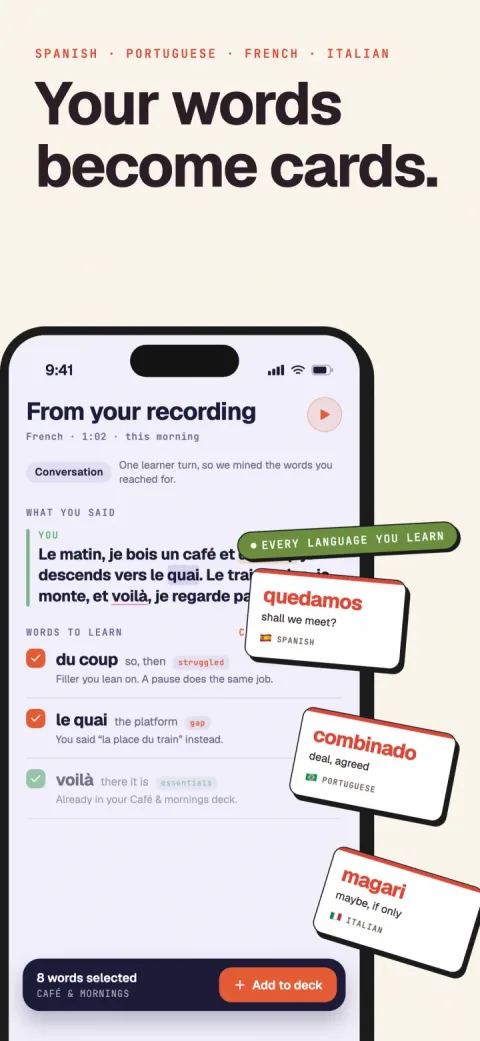
Verbamor turns the words from your own lessons and recordings into flashcards, and brings each one back before you’d forget it.

Who can actually make one, platform by platform
Start here, because for a lot of readers this section ends the page. Whether you can get a transcript of tonight's lesson comes down to your platform's billing tier, and you find out in about 30 seconds.
Zoom. The requirements list on Zoom's own transcription article has 3 lines: "A Pro, Business, Education, or Enterprise account", "Cloud recording enabled", "Audio transcription enabled".
A free Zoom account can't produce a transcript at all. Neither can a paid one recording locally to your laptop, because the transcript is generated from the cloud recording.
Clear all 3 Zoom requirements and the output is genuinely good. "Audio transcripts are saved in VTT format", which is a plain text file you can open in TextEdit or Notepad, timestamped and attributed by speaker.
The Zoom transcript doesn't email itself to you. Sign in to the Zoom web portal, go to Recordings & Transcripts, open Cloud recordings, click into the meeting, and the transcript sits among the recording files.
Zoom supports 19 transcript languages and all 5 of Verbamor's are on the list, but "by default, audio transcripts for cloud recordings are generated in English."
The Zoom transcript language is a per-file setting. Change it and "Zoom will reanalyze and transcribe the audio in the newly selected language." Do that before you skim anything.
Google Meet. Same shape of gate, different list. Transcripts need one of these editions: Business Standard, Business Plus, Enterprise Starter, Enterprise Standard, Enterprise Plus, Teaching and Learning Upgrade, Education Plus, Workspace Individual.
Your free gmail.com account is not on Meet's list, and neither is a paid Workspace tier below Business Standard.
Meet's transcript languages are "English, French, German, Italian, Japanese, Korean, Portuguese, Spanish." Russian is absent. If you're learning Russian on Meet, this route is closed and no setting reopens it.
Then check who booked the Meet call. "Meeting transcripts are saved in the meeting organizer's Google Drive in the 'Google Meet' folder." Your tutor scheduled the lesson, so you're now asking a person for a document instead of downloading one.
| Platform | What it costs you | Covers your language? | Who owns the file |
|---|---|---|---|
| Zoom | Pro, Business, Education or Enterprise, with cloud recording and audio transcription both switched on | All 5 (of 19 supported), if you set the language per file | You, as a VTT in the web portal |
| Google Meet | A paid Workspace edition from Google's published list | 4 of 5. Russian is absent | Whoever organized the meeting |
| italki Classroom | Nothing, and it buys you nothing here | Not applicable | italki |
italki. The Classroom's own audio "is saved on italki's private storage" and the separate Record Lesson button hands you a WEBM video in Chrome, Edge or Firefox only, so any transcript of an italki lesson is a job you do yourself. What italki gives you instead is a written summary, pulled apart in turning an italki lesson into flashcards.
Preply. Every sentence Preply publishes about downloading your lesson audio sits inside its Lesson Insights article, and Insights are English-only, so whether a Spanish or Russian lesson gets recorded at all is undocumented. Open Settings > Permissions and look for yourself, then read what a Preply lesson actually leaves you for the parts that survive in every language.
What lands in the file, and why it doesn't help yet
Check one Zoom setting first. Zoom is blunt about the default: "By default, audio transcripts for cloud recordings are generated in English."
So your Spanish lesson comes back as an English transcription of Spanish audio. Invented words, confident timestamps, all wrong.
Zoom's transcript language is a per-file setting. Change it and, in Zoom's words, "Zoom will reanalyze and transcribe the audio in the newly selected language." Spanish, French, Italian, Portuguese, Russian and German are all on Zoom's supported list, so the fix exists for every language Verbamor teaches. It never happens on its own.
Now open the transcript file. Zoom saves transcripts in VTT format, so every line arrives with a timestamp and a speaker label before any speech.
Hundreds of lines, in order, no paragraphs.
Some labels read Unknown Speaker, which is what Zoom writes when attribution fails. Any phrase is editable by hand in Zoom's web portal.
Here's the part that stops people. Nearly every word in the file is a word you already knew, because a lesson pitched at your level is comprehensible by design. The few items worth a card sit buried under sí, vale, and your tutor saying "mm-hmm" while you finished a sentence.
A transcript is a haystack a machine built for you, very fast, out of a haystack you were already standing in.
The file doesn't know which words were hard for you. You and the audio know that.
The text is flat. Your tutor's throwaway o sea and the verb you fumbled all lesson sit in the same grey.
I've read one of my own lesson transcripts end to end, once. I skimmed the back half, which is the same as not reading it.
What the transcript file gives you is coordinates. Every line is stamped, so you search it for a few things, jump to those timestamps, and listen. The next section is the search terms.
Both routes out of here filter the same file. Your own eyes with the timestamps doing the navigation, or a classifier that ranks what it finds. The manual one works tonight and installs nothing, so it goes first.
Twenty minutes with a transcript and no software
Get the Zoom transcript file first. Sign in to the Zoom web portal, open Recordings & Transcripts, go to Cloud recordings, click into the lesson, and the transcript sits among the recording files. Download it and open it in any text editor.
Check the language before you read a word of it. Zoom generates the transcript in English by default and only reanalyses after you change the language on that specific file, so an unchecked Spanish lesson comes back as phonetic slurry.
You'll run 4 searches, write down some timestamps, and close the file for good. Every line already carries the two things that make this work: a timestamp and a speaker label.
1. Search your own stalling. Type um, then uh, then whatever you say when you're fishing for a word: como se dice, comment on dit, your own tic.
Every hit is a moment your mouth stopped ahead of your brain, with a timestamp attached.
2. Search for English sitting inside a target-language sentence. Search the, with a space on either side. In a Spanish or French or Italian transcript a hit is usually you dropping an English noun into a sentence you otherwise had: entonces yo fui al, um, the courthouse
3. Find the short tutor turns wedged between two of yours. Corrections have a shape in a speaker-labelled file: you speak, your tutor speaks briefly, you speak again.
The brief ones sandwiched inside your own turns are where you got fixed.
4. Search your tutor's lines for we say and you can also say. Tutors telegraph, and that phrase sits directly in front of the idiom they've decided you're ready for.
For every hit, write down the timestamp. The word can wait.
Now close the text editor and open the audio.
Jump to each timestamp and listen to the 15 seconds around it. People skip this, and it's the step that makes the whole thing work.
A word on the page is a word you recognise, which is the weakest evidence you have about whether you know it. The audio gives you her delivery, her speed, and the thing you were quietly embarrassed about at 00:23:41.
Say each item out loud before you write it down. In Karpicke and Roediger's 2008 Science study, students who kept being tested on 40 Swahili-English pairs recalled about 80% of them a week later, against 36% for students who kept restudying the same pairs. The testing effect has the long version.
Give the search pass 20 minutes and stop when the timer goes, wherever you are in the file. I'd cap the list at 15 items even when the transcript holds more: a list you'll work through beats a complete one you won't.
Your list of items with timestamps is where this page ends. Turning it into cards that survive November is a separate craft, and I've written that up in turning lessons into flashcards: where the blank goes, and why you should keep far fewer cards than you found items.
What a machine does to the same file
Ctrl-F gives every occurrence of a word the same weight. It can't tell the word your tutor stopped and fixed you on from the word you produced cleanly and moved past, and that distinction is the whole job.
A classifier reads the speaker turns instead, and tags each candidate word with a reason. The reasons are ranked: struggled, corrected and gap sit above taught, used and personal. The worked example is on the italki notes comparison.
So here's the door, if you've got a transcript open right now.
Paste the transcript. Verbamor's paste screen takes up to 80,000 characters a go and runs the same classifier a recorded lesson does, so the VTT you pulled out of the Zoom portal an hour ago is a first-class input. Strip the timestamp lines or leave them in; it reads speaker turns either way.
If you hand Verbamor audio instead, transcription is ElevenLabs Scribe (scribe_v1) with diarization on, and that speaker split is what the reason-tagging stands on. The diarized transcript stays visible in the app, with pills for relabelling a speaker the machine got backwards.
There's no transcript export, so keep your own copy of the VTT.
Then you pick. Nothing becomes a card until you say so, and it's the part I'd defend hardest.
The tagging gets things wrong. A word you produced perfectly well can come back marked struggled because you paused to think.
One honest cost of the classifier, and it's the real one. Slamecka and Graf (1978) named the generation effect: material you generate yourself is remembered better than the same material read.
Picking a word off a list is weaker encoding than composing the sentence around it, and the card-writing guide makes the case for doing it by hand. My position is that the cards you'll actually make beat the better ones you won't, and you can rewrite the sentence at the first review.
Verbamor is iOS and iPadOS only, 16.4 or later. No Android, no web.
Verbamor costs $19.99 a month, or $129.99 a year with a 7-day trial attached to that yearly price. There's no free tier, an awkward sentence to write right after telling you the manual method works.
And Verbamor won't teach a beginner their first thousand words. It mines what a lesson contained,
Do you need a transcription pipeline at all?
Two kinds of learner don't need a transcription pipeline, and they should close this page and go do something else. Better I say so now than you work it out a month and one subscription later.
You're on a paid Zoom plan and you'll genuinely reread the VTT
The file Zoom hands you is already speaker-attributed, already timestamped, and hand-editable in Zoom's own web portal, so you can fix a mangled word where you find it. That covers the filtering job well enough for a person who will actually open it. The catch is the word "will".
So reread the VTT from your last lesson, right now, before the next paragraph. If you didn't, the pipeline was never about the transcript.
The second person takes good notes during the lesson. If you're writing down the word your tutor stopped you on, with the correction next to it, you're filtering by hand while the audio is still in the room. Every one of those notes is a card you can build tonight, and the card guide covers the design.
Two platform-specific answers live elsewhere. On italki, which parts of the summary you already get free and which sit behind Plus: that's here. On Preply, what survives a lesson in a language the Insights feature doesn't cover: that's here.
One limit on my end. Verbamor is iOS and iPadOS only, 16.4 or later, so on Android or at a desktop, one of the routes above is your route.
And Verbamor holds on to words you've already met, which makes it a poor way to learn your first thousand. A beginner is better served by a course for a few months, then this.
Questions people actually ask
Can I record my tutor without asking?
No, and on the two big tutoring platforms the software won't let you. italki is explicit: "In order for ANY recording to be made, BOTH the teacher AND the student must agree to give permission for italki to record their lesson audio." The same double consent applies to italki's Record Lesson button.
Preply runs the opposite model on Lesson Insights, where the learner alone can switch it on: "If your tutor doesn't enable them but you do, you will still receive insights. Your tutor's audio won't be recorded or analyzed." Ask anyway. A tutor who knows you're building cards from the file may well slow down on your corrections.
What's the best app that transcribes language lessons in 2026?
Depends on which half of the job you mean, because transcribing and filtering are separate steps and most tools only do one. Zoom and Google Meet transcribe well and hand you a wall of text with no vocabulary layer on top. Preply says it does both: "We generate Lesson Insights by transcribing the audio from your lessons and then extracting the insights."
The extraction step is what you're actually shopping for. Preply's is English only, and italki's Smart Lesson covers 35 languages but withholds error corrections unless you pay for Plus. Verbamor does the extraction on 6 languages, on iOS only.
Why is my Zoom transcript in English when the lesson was in Spanish?
Because that's Zoom's default and it's a per-file setting, not an account one. Zoom's own wording: "By default, audio transcripts for cloud recordings are generated in English." You change the language on the recording, and then "Zoom will reanalyze and transcribe the audio in the newly selected language."
So the English transcript you're staring at isn't broken, it's a first pass. Set the language and let it run again before you spend any time reading. Do it for every recording: the language is a per-file setting, so changing it on one transcript does nothing for the next.
My tutor uses Google Meet. Can I get a transcript?
Only if the person who scheduled the call pays for one of the eligible Workspace editions, and only in 8 languages: English, French, German, Italian, Japanese, Korean, Portuguese, Spanish. Russian isn't on that list, so a Russian lesson on Meet produces nothing.
There's a second trap even when it works. Meet saves transcripts "in the meeting organizer's Google Drive in the 'Google Meet' folder," so if your tutor booked the call, the file is in their Drive and not yours. Ask them to send it, or schedule the calls yourself.
Can I just paste a transcript into Anki or ChatGPT and get cards?
You can, and the cards will come out flat, because both will pull the words a lesson taught rather than the words you fumbled. Those aren't the same list. The ones worth reviewing are where you stalled, got corrected, or reached for something you didn't have.
A transcript records all of that, in your own hesitations and in your tutor's repairs, which is why the ranking Verbamor uses puts struggled, corrected and gap above taught. If you're pasting into a general tool, tell it to find those moments rather than asking it for vocabulary.
How long does the whole thing take, honestly?
The search pass on this page takes 20 minutes on a 60-minute lesson once you've done it twice. The first time is slower, because you're learning what your own stalling looks like in writing.
Do it the same evening. Sleep within a few hours of learning improves recall on vocabulary specifically, which Gais, Lucas and Born showed in 2006, and a transcript goes stale in a way the file doesn't: you can still read it on Saturday, but you'll no longer remember which sentence was the one you got wrong.
A transcript is raw material. Cards are the product.
Verbamor reads the lesson, finds the words you actually stumbled on, and writes the cards with audio while you make coffee.
Start 7 days freeThe 7-day free trial is on the yearly plan.