 Verbamor
Flashcards from your italki lesson, and what italki keeps back
Copy the Vocabulary block from italki's free Lesson Summary into flashcards tonight, and keep only the words you fumbled out loud; the free summary covers topics, vocabulary and grammar, while your error corrections sit behind italki Plus at $5.99 a month. No summary means one of 4 conditions failed.
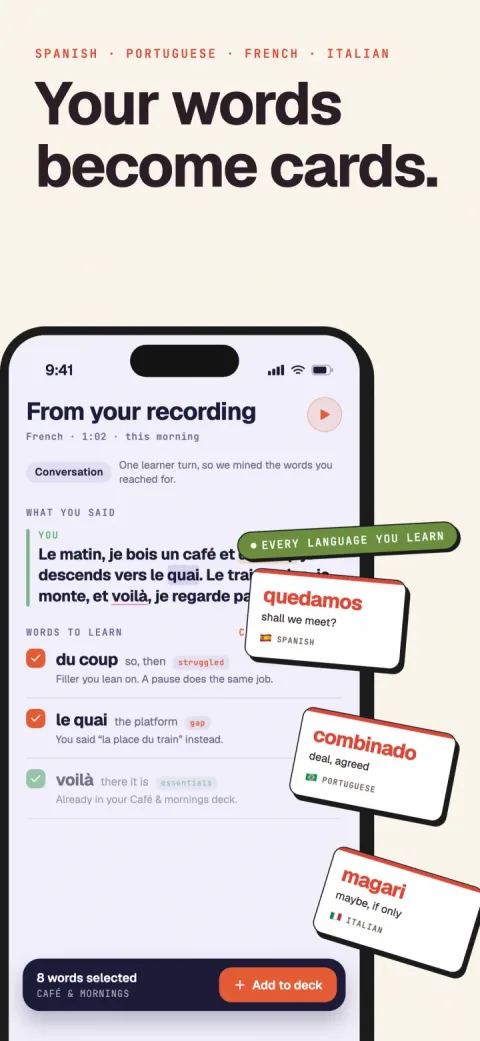
Verbamor turns the words from your own lessons and recordings into flashcards, and brings each one back before you’d forget it.

italki's free Lesson Summary hands you the lesson's topics, vocabulary and grammar, with no notes taken during class, ready to copy into cards tonight. It keeps back your error corrections and idioms, which sit behind italki Plus at $5.99 a month. And the summary only exists if 4 conditions held before you clicked join, one of them your teacher's call.
Open the lesson you just paid for. Go to its Lesson Detail page and look for the Lesson Summary.
Either the summary is sitting there (topics, vocabulary, grammar, generated while you said goodbye), or the page has nothing on it and never will.
Tonight can't repair an empty summary page. The summary is built from the lesson audio, and that recording either happened or it didn't. italki is blunt about the consent: "In order for ANY recording to be made, BOTH the teacher AND the student must agree to give permission for italki to record their lesson audio." A toggle you flip now doesn't reach backwards.
So the 4 conditions are a diagnosis. Which of the 3 situations you're in decides what's on the table tonight.
If you cleared all 4, italki solved capture for you. What people go looking for, some way to "automate flashcard creation from my actual lessons," is already on your screen.
The free summary covers what your teacher taught. Your error corrections, the sentences you got wrong and got fixed on, sit behind italki Plus.
Check these 4 things before anything else
Open italki, go to the lesson you just finished, and look at the Lesson Detail page. Either a Lesson Summary is sitting there or it isn't, and which one you're looking at was decided before the lesson started.
Four conditions have to hold at once. italki lists them in its own support article, and I've never found all 4 written out anywhere else.
- The lesson ran in italki Classroom. italki's wording: "The lessons must be taken in italki Classroom." A lesson you took on Zoom with the same teacher produces nothing.
- Your recording toggle was on. "Make sure to turn on your lesson audio recording in the Privacy Settings." That's where the switch lives, not in the lesson screen.
- Your teacher's was on too. "In order for ANY recording to be made, BOTH the teacher AND the student must agree to give permission for italki to record their lesson audio." italki's advice: "ask them to turn on their lesson audio recording to enable the learning tools, or you can find teachers who provide these accesses by searching for those with the 'Smart Lesson' label."
- Your language is supported. Smart Lesson covers 35 languages, and Spanish, French, Italian, Portuguese and Russian are all on the list.
One more thing while you're in there: the recording only happens in the web version of italki Classroom.
Now the part that decides your evening. These 4 conditions are a diagnosis, not a repair job.
If your toggle was off during tonight's lesson, tonight's audio doesn't exist. Turning it on now fixes every lesson from here and does nothing for the hour you just paid for.
So you're in one of 3 situations, and the rest of this page is written for all 3.
- All 4 held. The summary is on the Lesson Detail page right now. The next section is about what it hands you, and what it holds back.
- One failed, and you know which. Tonight is a salvage job from memory, and you've got about an hour before the details go soft. Fix the toggle for next time, then jump to the branch at the end of this page.
- You're not sure, or the summary is empty. Check Privacy Settings, then message your teacher. italki also lets you build one by hand: "we also provide a backup solution where you can manually create a Lesson Summary with your own notes and text resource."
One more thing before you pay for anything. italki Plus carries a 30-day free trial, and the error corrections sit behind it. If you're in situation 1, start the trial tonight and read the enhanced summary for this lesson before you decide whether it's worth $5.99 a month.
Starting the Plus trial is a real recommendation, and I sell the alternative.
What does italki's free lesson summary include?
The free summary comes in 3 labelled parts: topics, vocabulary and grammar. Open the Lesson Detail page for tonight's lesson. If a summary generated, it's sitting there, and italki's own wording is exact: "Topics: A brief overview of the subjects discussed. Vocabulary: Key words and definitions introduced during the lesson. Grammar: Explanations of the sentence structures and rules covered."
The 3-part summary is a good free tier. italki calls it a "Smart Lesson" tool that "helps you quickly review what was covered without needing to take manual notes during your session," and it does exactly that, for nothing.
Tonight the 3 parts are worth wildly different amounts.
Topics: read it once, keep none of it. "Weekend plans, then the imperfect" tells you where the hour went, and nothing else.
Vocabulary: your raw material, and a good chunk of it is filler. A word your tutor used once in passing sits at the same weight as the word you reached for 4 times and missed.
So rank the vocabulary list yourself, while you can still hear the lesson in your head. Put a dot next to every item you fumbled, hesitated over, or heard your tutor correct out loud.
I stop at 8 dots. That's the most cards I've ever built in one sitting and still opened on the Thursday. If a 25-word list gives you 3 dots, you're done in 4 minutes.
Dotted items win because struggle and correction outrank exposure, the ranking argued out on the italki notes comparison.
Grammar: the part that resists becoming a card. You can recite an explanation cleanly at 11pm and still freeze mid-sentence on Thursday.
Every grammar point you keep has to become a sentence with a hole in it, and where the hole goes is its own craft. Take your dotted points to the guide on turning lessons into flashcards.
Lesson Practice, on the same page, turns the summary into exercises, and the free tier gets "Vocabulary & Grammar Practice" (italki Plus adds AI Roleplay and unlimited repeats). Run it before you close the tab.
Lesson Practice can also refuse, and italki publishes the reason plainly: it won't generate "if there's not enough content from the lesson summary, i.e. fewer than 5 vocabulary words, or no grammar points."
So count the vocabulary list first. Under 5 items, the exercises are gone and your dotted words are the whole yield of the hour you paid for.
What to do when the corrections are the part you can't see
Your free summary is a syllabus. Topics, vocabulary, grammar: what your teacher meant to cover, and mostly did.
The moments where you said something wrong and got fixed are the paid part. Verbatim, from italki's support article: "For italki Plus subscribers, the summary is enhanced with advanced insights: Error Corrections: Feedback on mistakes made during the lesson and how to fix them. Idioms & Fixed Expressions".
Plus is $5.99 a month, or $4.99 a month billed annually, $59.99 a year, with a 30-day free trial.
So on the free tier, the only copy of tonight's corrections is the one in your head. Write it down tonight, while the audio is still playing.
Search on interruption. Ask where your teacher stopped you mid-sentence.
A correction has a shape you sat through: a pause, your word repeated back with one syllable different, you saying it again. Walk the lesson forward from the greeting and pick those moments off in order.
For each one, write 2 lines. What you said. What they said back.
Half-remember a correction? Write the shortest sentence you'd honestly swear you said, and put a question mark beside it. A hedged real sentence beats a dictionary example, because you can hear yourself saying it.
Then read the free summary's vocabulary list against your pairs, one word at a time, asking: did I produce this out loud, or did I nod at it?
Produced words and nodded-at words sit in the same font on the summary page. They don't feel the same to you, and that difference is worth writing down.
Card the nodded ones first. Verbamor sorts a transcript on much the same footing, and I've written out why on the italki notes comparison. Tonight it does nothing for you.
Getting the lesson out of italki
Your lesson was recorded. You still can't have it.
italki says so plainly: "The audio recording is saved on italki's private storage. It will be anonymized and used solely to improve the learning and teaching experience on italki." That recording exists to build your summary. It was never a file you were going to own.
So start where the text is. Open tonight's lesson on its Lesson Detail page, drag across the Topics, Vocabulary and Grammar blocks, and copy. That works on your phone, on the free tier, right now.
The other recording is the Record Lesson button inside Classroom. Press it and "the video will be saved automatically to your default drive for browser downloads on your computer", and italki is clear that "the video recording is not saved or uploaded to any online server... italki does not have access to your video."
Then read the Record Lesson restrictions. The button is "currently only supported in the Chrome, Edge, and Firefox web browsers", and you and your teacher both have to agree before it records anything. If you took the lesson in Safari, or in the app on your phone, italki's list has already answered the question for you.
You also press Record Lesson before the lesson. Which means the decision about tonight got made an hour ago, by someone who didn't know they were making it.
And what lands is a video: "The videos will be in a WEBM format". Anything you want to do with the speech starts with pulling the audio out of that, at 11pm, using software you probably don't have.
The third thing that leaves italki is whatever you typed into the notes pane, or into the manual summary italki offers as "a backup solution where you can manually create a Lesson Summary with your own notes and text resource."
Copy the text. It's the only one of the 3 with no conditions on it, and I'd still pick it if the video button worked in every browser on earth.
Text also travels further than a video does. Paste a summary into Verbamor and it goes through the same classifier a spoken lesson gets, up to 80,000 characters, which no lesson summary is going to fill. Paste it into a doc instead and work it by hand with the card-writing method.
Recording is the route with a deadline on it, and tonight's has passed. You can't reach back and record Tuesday's lesson on Wednesday, which is why the branch in the next section splits on what you already have.
The next hour, branched by which route you're in
Three routes came out of the 4 conditions. Run yours and be done before the lesson goes cold.
Route A: all 4 held, and the summary is on the Lesson Detail page.
Read the Vocabulary block first. Grammar second. Topics last, for 30 seconds, since italki calls it "A brief overview of the subjects discussed" and that's a table of contents.
The Vocabulary list arrives flat. The word your teacher used once while pouring coffee sits at the same weight as the one you stalled on twice.
So dot every item you fumbled out loud, and keep only the dots.
Copy the dotted items into a note, or paste the whole block into Verbamor, whose paste screen takes 80,000 characters and ranks what it finds by whether you struggled with it. Writing the cards is its own craft: the flashcards guide.
Route B: the page is blank, and it stays blank.
Tonight's audio was never captured, so start with what's in your head. Write every moment your tutor stopped you mid-sentence, each one as the wrong sentence you actually said.
Say each one aloud as you type it. Saying it is the first review.
Then fix the pipe. Turn on lesson audio recording in your Privacy Settings and book the next lesson in a browser.
Message your tutor too, since italki is explicit that "BOTH the teacher AND the student must agree" or nothing gets recorded. If yours would rather not, italki's search carries a "Smart Lesson" label you can filter on.
The 4 conditions diagnose your evening. Nothing you toggle tonight reaches back into the lesson you already had.
Route C: you're on italki Plus, so the good part is already written down.
Go straight to Error Corrections, then Idioms & Fixed Expressions. Those are the two blocks Plus adds, and italki defines the first as "Feedback on mistakes made during the lesson and how to fix them."
Card the corrections and idioms before you touch Vocabulary. A correction is a sentence you got wrong out loud an hour ago with the embarrassment still attached, and the item most likely to still be wrong in November.
Then run Vocabulary as a second pass, same dot test as route A.
Whichever route you ran, read tonight's items out loud once before bed. Tonight rather than tomorrow matters more than the 3 minutes suggests, for reasons in the sleep post.
Who should just buy italki Plus instead
Here's the arithmetic.
italki Plus is $5.99 a month, or $4.99 a month billed annually, which comes to $59.99 a year. Verbamor is $19.99 a month, or $129.99 a year, with a 7-day trial that comes only with the yearly option, and no free tier.
Plus also opens with a 30-day free trial, so you can find out whether the corrections and idioms are worth anything before a charge lands.
italki Plus and Verbamor are different purchases. Plus bolts tools onto lessons you already buy on italki. Verbamor bills whether or not you booked a lesson.
Your teacher has Smart Lesson on and you'll do the exercises
Recording toggle on, summary after every lesson, and you actually open Lesson Practice instead of nodding at the vocabulary list and closing the tab. The loop already runs inside the platform you pay for. Start the 30 days tonight.
Two limits on my side, and they're real.
Verbamor is iOS and iPadOS only, 16.4 or later. If you're on a Pixel, the paste route above ends nowhere, and Plus is the honest answer.
And Verbamor holds on to words you've already met. It won't teach you your first thousand. If you're 3 lessons into Portuguese and every word in the summary is new, a beginner course moves you faster.
The first-thousand limit is about your level. Owning a tutor has nothing to do with it. You can build cards by pasting text or saving words out of Translate. If you'd rather test the habit first, the routine in the free handbook costs nothing.
Questions people actually ask
Why is there no Lesson Summary after my italki lesson?
One of 4 things failed. The lesson has to happen in italki Classroom, you have to have turned on lesson audio recording in your Privacy Settings, your teacher has to have turned theirs on too, and the language has to be one of the 35 the AI features support (Spanish, French, Italian, Portuguese, Russian and German all are).
italki is explicit that both sides must agree: "In order for ANY recording to be made, BOTH the teacher AND the student must agree." So a teacher who leaves it off ends the matter for that lesson, whatever you toggle afterwards.
Can I get a summary for a lesson I already took?
No. The summary is generated from audio recorded during the lesson, so if the recording didn't happen, there's nothing for italki to read afterwards. Flipping the Privacy Settings toggle tonight changes your next lesson and does nothing for the one you just paid for.
What you can still do tonight is write the lesson up from memory while it's warm, and italki supports that directly: "we also provide a backup solution where you can manually create a Lesson Summary with your own notes and text resource." Do it in the next hour, not tomorrow.
Are italki's lesson summaries free?
The 3-part summary is: Topics, Vocabulary, and Grammar. Your error corrections and the idioms and fixed expressions your teacher used are italki Plus, listed at $5.99 a month or $4.99 a month billed annually, with a 30-day free trial.
The free-versus-Plus split matters more than the price. The corrections are the record of what you got wrong out loud, which is the best card material an hour of tutoring produces, and it's the half that's gated.
Can I download the audio from my italki lesson?
Not the recording italki makes. That one "is saved on italki's private storage" and gets anonymised for italki's own use, with no learner-facing download.
The separate Record Lesson button is a different feature: it saves a WEBM video to your own computer, italki never sees it, and it works only in Chrome, Edge and Firefox. Both of you have to agree to that one too. It's a video file, so anything you want to do with the speech means pulling the audio out first.
How do I turn an italki lesson summary into flashcards?
Select the italki summary text and paste it somewhere that can read it. Verbamor's paste screen takes up to 80,000 characters and runs the same classifier a recorded lesson does, ranking what it finds by why the item earned a card, with the words you struggled with and got corrected on above the ones merely taught. I explain that ranking properly on the italki notes comparison.
By hand works too. Take the Vocabulary list, find the sentence each word appeared in, and blank the word. Card craft is its own job, covered in turning lessons into flashcards.
Should I just pay for italki Plus instead of another app?
If your teacher already has recording on and you'll do the Lesson Practice exercises italki builds from each summary, yes. Plus is $5.99 a month against Verbamor's $19.99 monthly (or $129.99 yearly), and the 30-day trial means you can find out for free whether you'll use it.
The case for something else is narrower than it looks. Verbamor is iOS and iPadOS only, and it holds on to words you've already met rather than teaching a beginner their first thousand. What it does that Plus doesn't is schedule the reviews, which is the part italki's exercises leave to you.
italki taught it. Something has to keep it.
Verbamor takes the lesson you already paid for and builds the cards, with the sentence your teacher actually said and audio on every one.
Start 7 days freeThe 7-day free trial is on the yearly plan.