 Verbamor
Anki and language apps: what each one costs you
Anki costs you the building: it's free apart from the US$24.99 iPhone app, but ten Italian cards made by hand took 24 minutes 30 seconds. A language app costs you the choice of words, since the course picks them, plus a subscription. Under 45 minutes of card-making a week, build them yourself.
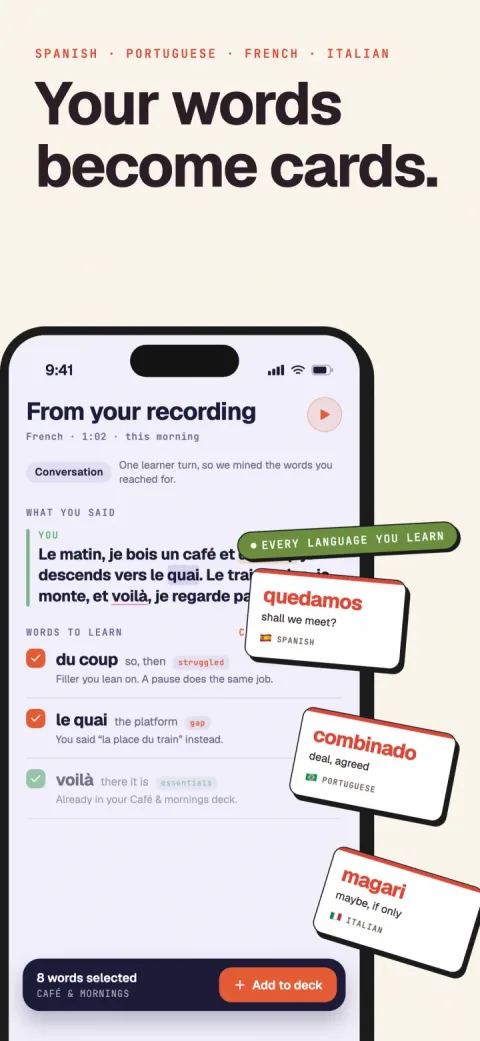
Verbamor turns the words from your own lessons and recordings into flashcards, and brings each one back before you’d forget it.

You install Anki on a Tuesday. You want to learn Spanish. Anki opens to an empty window with no cards in it.
What Anki ships is a scheduler and a card editor. The Spanish is your job.
01 / 06 · what anki costsAnki gives you the scheduler and leaves the words to you
Anki is a spaced repetition program released in 2006. Spaced repetition means it shows you a card just before you'd have forgotten it, so each review does more work.
The free parts are genuinely free: desktop Anki on Windows, macOS and Linux, AnkiDroid on Android, and AnkiWeb syncing. There's no monthly fee anywhere in Anki.
The iPhone and iPad app, AnkiMobile, is US$24.99 as a one-time purchase, checked against the App Store listing on 23 August 2026, and what Anki costs has the other platforms and regions. And whether Anki is worth paying for turns on the card-building bill behind that price more than on the price itself.
What Anki holds back is content. Anki's own manual is direct about this: "Creating your own deck is the most effective way to learn a complex subject." The manual also warns that shared decks work best as a supplement to material you're already studying.
Anki's newest scheduler, FSRS, isn't turned on by default. FSRS fits a memory model to your own review history instead of applying a fixed formula.
It's been built into Anki since version 23.10 in October 2023. But the default scheduler is still SM-2, the older algorithm Anki inherited from SuperMemo in 1987.
The manual calls FSRS "an alternative to Anki's legacy SuperMemo 2 (SM-2) algorithm" and leaves it to you to enable, in the last section of deck options. Turn it on.
The default desired retention once you turn FSRS on is 90%: Anki schedules each card so you have a 90% chance of recalling it when it comes back.
02 / 06 · what an app costsAn app hands you content in 30 seconds, and picks the words for you
A language app sells you the part Anki refuses to do. Someone else picked the words, wrote the sentences, hired the voice actors and ordered the lessons. You open it and there's something to study in 30 seconds.
Prices are harder to pin down than you'd expect. Duolingo's US App Store listing showed six Super Duolingo price points on 23 August 2026, from $9.99 to $119.99. Apple doesn't label which price belongs to which billing term, so no honest monthly figure can be quoted from it.
Tutoring publishes its mechanics more clearly. Preply's help centre says a subscription runs in 28-day cycles and is tied to one tutor. It also says there's a minimum of four lessons per cycle, and that unscheduled lessons "expire at renewal and do not carry over."
Plan around those four, because the one you never booked is gone.
The cost that's harder to see: the content belongs to the course. It teaches its own word list, in its own order, at its own pace.
If your Italian teacher spent Tuesday drilling the difference between magari and forse, no app has a lesson about your Tuesday. You either settle for the closest thing in the course or build the cards yourself, which puts you back in Anki.
Some apps do run real scheduling underneath. Duolingo published and open-sourced a spaced repetition scheduler, half-life regression, in a peer-reviewed paper by Settles and Meeder at ACL 2016. That paper is still the last public statement Duolingo makes about its scheduler, and it says nothing about what runs in production today.
Memrise's help centre publishes the whole ladder: "4 hours > 12 hours > 24 hours > 6 days > 12 days > 48 days > 96 days > 6 months". A wrong answer sends the item back to 4 hours. That article was last updated on 17 June 2026.
Clozemaster's own documentation publishes a mastery ladder: 0% mastered the same day, 25% the next day, 50% at 10 days, 75% at 30 days, 100% at 180 days.
Neither ladder adapts to you. A word you find easy and a word you keep failing move along the identical rungs. So the schedule carries no information about your memory.
03 / 06 · the testCheck the help centre first: intervals mean a scheduler, buckets mean a counter
Run this on any app, including one nobody has reviewed.
- Open the app's help centre and search two terms: "spaced repetition" and "interval". An app doing real per-card scheduling names the mechanism somewhere, because it's the expensive part to build.
- Read what the article says the app does with time. The rule: if it states actual intervals in units of time, it's a scheduler. If it only names buckets like "Still Learning" and "Mastered", it's a counter. A counter records how often you were right and never decides when to ask you again. Deciding that is the entire job of a scheduler.
- Check the platform caveat in the same article, because it's usually one line near the bottom.
Quizlet shows both results in one help centre. Its article "Studying with Spaced Repetition" states the intervals plainly: Repeat returns the card within minutes, Okay in about a day, Easy in four or more days. That passes step 2.
Its Progress feature only groups terms into Not Studied, Still Learning and Mastered by how often you answered correctly. That fails step 2.
Step 3 catches the rest: Quizlet's article says its spaced repetition "is currently only available on the Quizlet website". Its App Store listing for the iPhone app (version 10.56, 13 October 2026) names Spaced Repetition as a feature, though, so Quizlet's own pages disagree. On a phone, check the app itself before you trust either.
04 / 06 · the timed runHow long does it take to make Anki cards by hand?
About 2.5 minutes a card, in one timed run. Building a good Anki card from scratch means finding the word, writing a sentence that shows how it's used, finding or recording audio, and adding an image.
Here's that run with a clock on it. Ten Italian cards from one lesson took 24 minutes 30 seconds end to end.
Seven of the ten cards were one-liners at roughly 90 seconds each, about 10 minutes for the batch. One middling word took 3 minutes.
The last two, magari and forse, took 11 minutes between them. Both translate as "maybe" and separating them meant reading up on the fact that magari carries a wish and forse is neutral. Two cards out of ten ate 45% of the session.
Where the ten-card run comes from: 19 August 2026, a B1 (intermediate) Italian learner, ten words from one 50-minute tutor lesson. Audio was recorded by hand into the Anki editor rather than found, because free clips for single Italian words are unreliable.
The magari and forse lookup used Treccani's dictionary and the tutor's own recording. That's what made it slow: the answer took reading, and one search wasn't enough.
The Foreign Service Institute, which trains United States diplomats, puts Spanish, French, Italian and Portuguese in its easiest group. It estimates 552 to 690 class hours to reach professional working proficiency, Spanish at 30 weeks. Card-making sits outside those class hours, a separate bill you pay every week.
James Milton's survey of vocabulary tests attaches about 2,750 words to B1 on the CEFR (the European scale of language levels), across his English, French and Greek learners. B1 is the level at which you follow ordinary speech on familiar topics. At 15 new words a week, that deck takes about three and a half years to build by hand.
The reviews are the easy part of Anki. People quit because it's 9pm, there are 18 new words from today's lesson, and none of them are cards yet.
05 / 06 · where i sitVerbamor sells back the building, with no course, no Android and no free tier
Verbamor works best for people who already have lessons or conversations to mine, though a tutor isn't required. If you're starting from zero with no tutor and no recordings, take a structured course and come back when you have real conversations to build cards from.
Verbamor is an iOS app for Spanish, French, Italian, Portuguese and Russian. It takes the middle position: your content, in cards you don't build.
You record or import a lesson, and the app transcribes it and pulls out the words and multi-word phrases you actually met. You pick which ones to keep.
It builds each card for you: an example sentence, an image, and two recordings of it. One recording is complete, and one has the answer replaced by a tone so you produce the word yourself.
Those cards go into a queue scheduled by FSRS-6, via the ts-fsrs library, at a default desired retention of 90%. That's the same algorithm generation and the same target Anki uses once you enable it there.
Here's the honest gap. The 24 minute 30 second figure above was timed by hand. The matching Verbamor run on those same ten words hasn't been timed to the second, so don't take a number from me for the second half of the comparison.
Time it yourself during the trial, with the same stopwatch you used for Anki. That's the only version worth having, because your active time depends on how many words you keep and the wait depends on your connection.
What Verbamor doesn't do: it has no course, so past a starter deck of about 650 common words, there's nothing to study until you feed it audio. It's iOS only, no Android and no desktop. It teaches five languages (Spanish, French, Italian, Portuguese and Russian) and no others.
It doesn't let you write your own card templates or install add-ons, which is the main thing Anki people miss.
And there's no free tier. Explorer is US$19.99 a month. Native is US$129.99 a year, which works out to about $10.83 a month, and the 7-day free trial exists on the annual plan only.
AnkiMobile's $24.99 is a one-time purchase. At $129.99 a year, that same $24.99 buys about ten weeks of Native, and then Anki keeps working forever while the subscription keeps billing. What the subscription buys is the card construction, repeatedly, for as long as you keep taking lessons.
06 / 06 · how to decideTime 10 cards, twice. Under 45 minutes a week, build them yourself
Install desktop Anki, which is free. Take the last lesson you had and make 10 cards from it by hand. Write the sentence yourself, add audio if you can, and time it honestly, including looking up how the word is really used.
Record each card's time separately, and mark every card over three minutes. In the run above, two cards took 45% of the session, so an average hides the thing you're measuring.
Then multiply. Divide your total by 10 to get your minutes per card, and multiply by the new words you meet in a week. Call it 15, a normal week with a weekly tutor.
The run above gives 2.5 minutes per card, so 15 words costs about 38 minutes.
Here's the cutoff. Under 45 minutes a week, build the cards yourself, enable FSRS on day one and stop reading comparison posts.
Over 45 minutes, time a trial of whatever you're considering against the same 10 words. Then pay whoever gets that number under your threshold, whether that's Verbamor or a course app whose word list you can live with.
Then do the second week. Run the same 10-card test seven days later, on that week's real lesson. Two completed runs is the evidence; one run only proves you were curious today.
If week two never happens, you have your answer, and it arrived for free.
Make the 10 cards, twice. The clock will tell you which bill you're willing to pay.
Your lesson, built into cards, not typed by hand.
Verbamor takes the transcript, pulls the words you actually met, and builds the card, so you get a scheduler without the hand-building bill.
Start 7 days freeThe 7-day free trial is on the yearly plan.