 Verbamor
How to make flashcards on iPhone, step by step
To make flashcards on an iPhone, type them into an app such as Quizlet or AnkiMobile, or into AnkiWeb in Safari. In Quizlet, tap Create, then Flashcard set; in AnkiMobile, tap Add while reviewing.
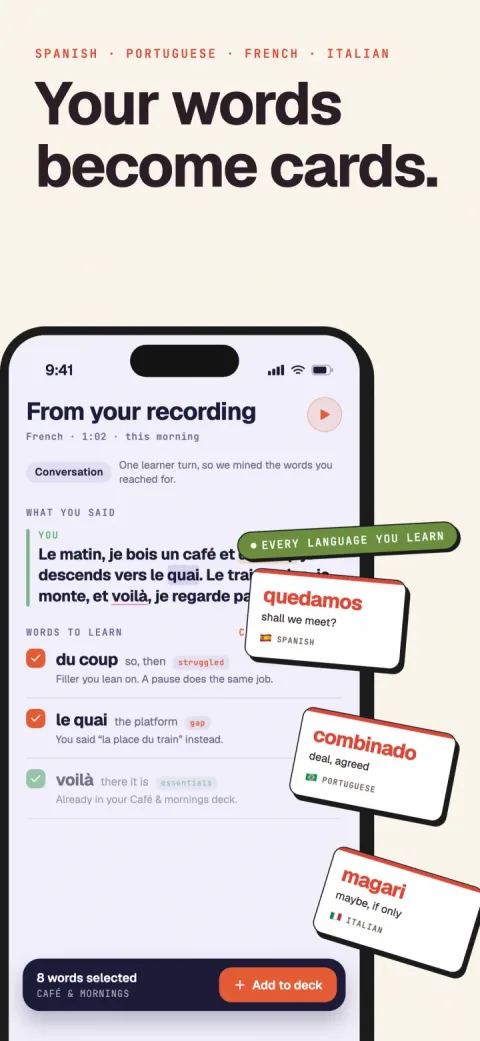
Verbamor turns the words from your own lessons and recordings into flashcards, and brings each one back before you’d forget it.

Quizlet is a free download (read 17 Oct 2026), and AnkiMobile costs US$24.99 once on the US App Store (read 13 Oct 2026). Typing is the slow part: Migaku, which sells a competing tool, uses 30 seconds per card in a worked example (read 13 Oct 2026).
How do you make flashcards in Quizlet on iPhone?
In Quizlet's iPhone app, you make a set by typing a title, then a term and a definition for each card. These steps come from Quizlet's help centre article on creating sets, updated 8 Oct 2026.
- Open the Quizlet app.
- Tap Create.
- Tap Flashcard set.
- Type a title for the set.
- Type the term.
- Type the definition.
- Tap + to add the next card.
- Repeat steps 5 to 7 for every card.
- Tap Done to save and publish the set.
The app needs iOS 17 or later. On 17 Oct 2026, its US listing showed a 4.8 average from about 1.13 million ratings.
What can't you do in Quizlet's iPhone app?
Quizlet's iPhone app lacks some card features that its website or its Plus plan has. Each line below comes from Quizlet's own help centre, read on 17 and 18 Oct 2026.
- Pictures: the iPhone app takes 1 picture per card, on the definition side only. Uploading your own picture needs Quizlet Plus.
- The free image gallery: it works on the website only.
- Your own audio: recording it needs Quizlet Plus, and it works on the website only.
- Text to speech: the help centre says it may not cover every language you study.
- Scanning a page: making a set from a camera scan needs Quizlet Plus.
Quizlet's iPhone app can show a set in both directions. Flashcards shows the definition first, and the Card Orientation setting in its Options menu switches the side (help centre, updated 17 Oct 2026).
Use the Quizlet website if you want spaced repetition. Its help centre, updated 17 Oct 2026, says the feature is only there, though the App Store listing names it among the app's features.
A 2-star App Store review of Quizlet says it plainly: "I wish typing cards was as efficient as it used to be."
How do you make Anki cards on an iPhone?
On an iPhone, Anki is the AnkiMobile app, which costs US$24.99 once on the US App Store (read 13 Oct 2026). You add a card by tapping Add while reviewing, choosing a note type and typing into each field.
These steps follow the AnkiMobile manual, read on 17 Oct 2026.
- Start reviewing the deck you want to add cards to.
- Tap Add.
- Tap Type at the top of the screen.
- Choose Basic (and reversed card).
- Tap the Front field.
- Type the word.
- Tap the Back field.
- Type the meaning.
- Tap the save button.
The paperclip button is optional. It attaches a photo, a file or a microphone recording to the field you're in.
Step 4 matters for languages. Anki's manual says Basic (and reversed card) creates 2 cards from one note: front to back, and back to front.
Plain Basic gives you one direction only. Reversing cards has confused people. A 1-star App Store review of AnkiMobile, from August 2022, says "So I have to make two versions of every flash card."
AnkiMobile can read a card aloud through TTS tags in a card template, using the voices built into iOS.
Can you make Anki cards on an iPhone for free?
Yes, through AnkiWeb in Safari. Anki's AnkiWeb page says it can "create basic text-only cards and review them" without any app (read 18 Oct 2026).
For pictures, audio and shared decks, the same page says you also need Anki's free computer app.
AnkiMobile's App Store listing says you can "add content on a computer and then study it on your mobile". Anki's desktop app and AnkiWeb sync cost nothing.
What does a language flashcard need on an iPhone?
A language flashcard needs audio and practice in both directions, and a picture helps you remember it. Here's where each app stood on 17 and 18 Oct 2026.
The Brainscape column shows its plans. Brainscape's pages don't say which of these features work in its iPhone app.
| Need | Quizlet iPhone app | AnkiMobile | Brainscape plans |
|---|---|---|---|
| Audio | Text to speech, which the help centre says may not cover every language; your own recordings need Plus and the website | iOS voices through TTS tags, or a recording from the microphone | Audio is a Pro feature |
| Picture | 1 per card, definition side; your own needs Plus | From the camera or photo library | Pictures are Pro, 1 per side |
| Both directions | Card Orientation flips the whole set; definitions show first by default | The Basic (and reversed card) note type | Reverse flashcards are Pro |
Which flashcard app should you use on an iPhone?
The right flashcard app on an iPhone depends mostly on your subject and on how much typing you'll accept. Here's how the 3 typing routes compare.
| Route | First taps | Price on iPhone | What you type |
|---|---|---|---|
| Quizlet | Create, then Flashcard set | Free download; Quizlet Plus has no price in the help centre | A title, then a term and a definition for every card |
| AnkiMobile | Add, while reviewing | US$24.99, one-time (read 13 Oct 2026) | Every field of every note |
| AnkiWeb in Safari | Log in at ankiweb.net | Free account | Basic text-only cards, with no pictures or audio |
- Any subject, and typing is fine: Quizlet. It's a free download, and its website handles import.
- Any subject, with full control of every field: AnkiMobile at US$24.99 once.
- Any subject, with no money to spend: AnkiWeb in Safari, for basic text-only cards.
- Language vocabulary, without typing the cards: one of the routes in the next section.
More on this: flashcard apps for language learning and Anki alternatives on iOS.
Can you make flashcards on an iPhone without typing every card?
Yes. 3 tools write cards for you, and a shared deck gives you cards someone else wrote. At 30 seconds per card, Migaku's worked example, 1,500 typed cards take about 12.5 hours.
- Quizlet Smart Assist turns pasted notes, an uploaded file or a topic into draft flashcards. Quizlet's article doesn't say which plan it needs, or whether it works in the iPhone app.
- Brainscape's Basic plan says you can "Use AI to make 100s of flashcards" (pricing page, read 17 Oct 2026). The page doesn't say whether that works in Brainscape's iPhone app.
- An Anki shared deck gives you cards other users made. In AnkiMobile, the manual says the Shared Deck List opens AnkiWeb.
- Verbamor, which I build, writes language cards from a word you save, a text you paste or a lesson you record.
How does Verbamor make a card without typing it?
I build Verbamor, so weigh my view of it accordingly. It makes vocabulary cards in 5 languages only: Spanish, French, Italian, Portuguese and Russian.
It's paid, and AI writes every card with no human review. You can't edit the card text or write a fully custom card.
For anatomy, law or any other subject, or to write every card yourself, use Anki or Quizlet.
In Verbamor's Translate tab, a card takes these steps:
- Open the Translate tab.
- Type a word or a sentence.
- Tap Translate.
- Tap the word you want to keep.
- Tap the add button at the bottom of the screen.
Each card arrives with the word, an example sentence, a picture and 2 native-accent recordings of the sentence. Each new word becomes 2 cards.
You can also paste text of up to 80,000 characters, or record a lesson of up to 90 minutes. Recording other people needs their permission first.
The guide to automatic cards from lessons covers the recording route. Verbamor costs US$19.99 a month, or US$129.99 a year with a 7-day free trial on the yearly plan (US prices, read 21 Sep 2026).
Questions people actually ask
Are Quizlet flashcards public on iPhone?
Yes, by default. Quizlet's help centre says published sets are public by default, and you can change a set's visibility at any time (read 17 Oct 2026).
Can you import a word list into Quizlet on iPhone?
No. Quizlet's help centre says importing works only on the website, and the iPhone app can then study the imported set (read 17 Oct 2026).
Can you study Quizlet flashcards offline on iPhone?
Quizlet's help centre lists offline studying among the features of its paid plans (read 17 Oct 2026). The help centre doesn't publish a price for those plans.
Is AnkiMobile worth US$24.99 if you make only a few cards?
Anki's own FAQ says people who don't use Anki enough to justify the price can use AnkiWeb instead (read 18 Oct 2026). AnkiWeb makes and reviews basic text-only cards in Safari at no cost.
Sources
Quizlet on iPhone
- Quizlet Help Center. Creating flashcard sets. Updated 8 Oct 2026, read 17 Oct 2026. The iOS steps, and sets public by default.
- Quizlet Help Center. Adding your own images to sets. Updated 13 Oct 2026, read 17 Oct 2026. Plus only; 1 image on the definition side in the iOS app.
- Quizlet Help Center. Adding images to sets from the free gallery. Updated 1 Oct 2026, read 17 Oct 2026. Website only.
- Quizlet Help Center. Recording custom audio. Updated 14 Oct 2026, read 17 Oct 2026. Plus only, website only.
- Quizlet Help Center. Creating sets by importing content. Updated 15 Oct 2026, read 17 Oct 2026. Website only.
- Quizlet Help Center. Creating a set by scanning a document. Updated 11 Oct 2026, read 17 Oct 2026. Plus only.
- Quizlet Help Center. Creating study sets with Smart Assist. Updated 16 Oct 2026, read 17 Oct 2026.
- Quizlet Help Center. Studying with Flashcards. Updated 17 Oct 2026, read 18 Oct 2026. Card Orientation in the iOS app; text to speech not in every language.
- Quizlet Help Center. Studying with Spaced Repetition. Updated 17 Oct 2026, read 17 Oct 2026. Website only, per the article.
- Quizlet Help Center. Subscribing to Quizlet. Updated 16 Oct 2026, read 17 Oct 2026. Offline studying on paid plans; no price listed.
- Quizlet on the App Store, version 10.56. Read 17 Oct 2026. iOS 17 or later, ratings, and the Spaced Repetition feature line.
Anki and AnkiMobile
- Anki Manual. AnkiMobile: adding and editing. Read 17 Oct 2026. The Add, Type, paperclip and save steps.
- Anki Manual. Getting started: note types. Read 17 Oct 2026. Basic (and reversed card).
- Anki Manual. AnkiMobile: text to speech. Read 17 Oct 2026.
- Anki Manual. AnkiMobile: shared decks. Read 17 Oct 2026.
- AnkiWeb. About AnkiWeb. Read 18 Oct 2026. Basic text-only cards in a browser; media and shared decks need the computer app.
- Anki FAQs. Why does AnkiMobile cost more than a typical mobile app? Read 18 Oct 2026.
- AnkiMobile Flashcards on the App Store. US$24.99, read 13 Oct 2026 and 17 Oct 2026. apps.ankiweb.net for the desktop app.
Brainscape
- Brainscape. Pricing. Read 17 Oct 2026. AI card-making on Basic; pictures, audio and reverse flashcards on Pro.
- Brainscape Help Center. How do I add images and sounds to flashcards? Updated 24 Sep 2026, read 17 Oct 2026.
How long typing cards takes
- Migaku. How to make Anki cards. Read 13 Oct 2026. A worked example of 30 seconds per card: 1,500 cards in about 12.5 hours. Migaku sells a competing tool.
Save a word. Get the whole card.
Verbamor turns a word you look up, a text you paste or a lesson you record into finished cards. Each card has an example sentence, a picture and spoken audio.
Start 7 days freeThe 7-day free trial is on the yearly plan.