 Verbamor
How to practice old words on Duolingo without redoing lessons
To practice old words on Duolingo, use the Words or Mistakes session in the Practice tab. The Practice tab is the barbell icon in the bottom menu. Duolingo announced on 18 February 2026 that the Practice tab is free for all learners.
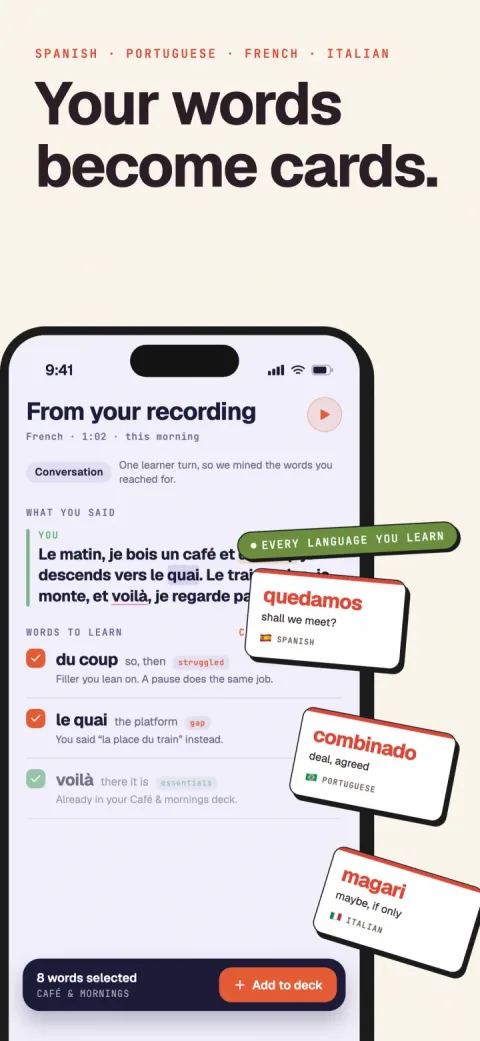
Verbamor turns the words from your own lessons and recordings into flashcards, and brings each one back before you’d forget it.

The Practice tab is Duolingo's quickest route to old words. You can also reopen a finished unit and replay a lesson as a review lesson or as Legendary.
Duolingo picks the words in each Practice tab session. To drill words you choose, use the notebook method below.
Where is the Practice tab on Duolingo?
The Practice tab is the barbell icon in the bottom menu of Duolingo's home screen. Duolingo's guide to it lists 4 Practice tab sessions: Mistakes, Words, Speak and Listen.
- Open Duolingo on your phone.
- Tap the barbell icon in the bottom menu.
- If you don't see a barbell, tap the circle with 3 dots (•••).
- Tap the barbell in the menu that opens.
- Tap Words to study the words Duolingo recommends.
- Tap Mistakes instead to review the mistakes you made before.
Duolingo's 18 February 2026 post says "skill lessons in the Practice tab" are available on iOS and Android. The post doesn't mention the web.
Can you practice old words on Duolingo on a computer?
Duolingo's practice posts don't say whether the Practice tab works on the web. Its 1 October 2026 post on reopening old units names no platform either.
So on a computer, check your own screen first:
- Sign in at duolingo.com.
- Check for a barbell icon or a Practice item.
- If you find one, click Words or Mistakes.
- If you see a unit label on the learning path, follow the old-unit steps below.
- If neither appears, use the notebook method below.
The notebook method works on any computer or phone, because it needs no app.
Is Duolingo practice free?
Yes. Duolingo's blog said on 18 February 2026 that it had made Practice tab sessions available to all learners for free, for the first time.
Before that, mistakes practice was a Super feature, which is why older articles sell it as a paid perk. Other old Duolingo advice has changed too:
- Explain My Answer is free. Duolingo's same 18 February 2026 post says it's free for all learners.
- Energy is the limit on lessons now. Duolingo's US App Store listing offers Super with "Unlimited Energy" as a perk.
Can you go back to old units on Duolingo?
Yes. Duolingo's 1 October 2026 post says you can review previously seen content whenever you want, starting from the unit label.
- Open the learning path on Duolingo's home screen.
- Tap the colorful unit label. It shows the section number, unit number and unit name.
- Read the section list. It shows finished sections, your current section and later ones.
- Tap the label of a finished section to open its units.
- Tap the X at the top left to close the section list and return to your place.
Inside an old unit, Duolingo's 16 December 2025 post gives the next step. A completed lesson offers a quick review lesson with the same vocabulary and grammar.
- Tap a completed lesson in the old unit.
- Start the quick review lesson.
What is Legendary on Duolingo?
Legendary is the harder version of a completed lesson on Duolingo. Duolingo's 16 December 2025 post says it has more challenging exercises and no hints.
- Tap a completed lesson on the learning path.
- Tap the Legendary option.
Duolingo's help centre lists "unlimited attempts at Legendary challenges" as a Super Duolingo benefit. The page doesn't say how many attempts a free learner gets. I checked it in October 2026.
Use Legendary when a review lesson feels too easy. A lesson with no hints asks you to recall more of each word.
How does Duolingo pick the words you review?
Duolingo says its personalized practice lessons use spaced repetition, along with your accuracy, to pick the words and grammar you review. That's from a 26 December 2023 post on Duolingo's blog.
Duolingo also published its own spaced repetition model, half-life regression, at the ACL conference in 2016 (Settles and Meeder). The Duolingo pages I read don't say whether that exact model runs today.
Can you choose which words Duolingo reviews?
I read Duolingo's help centre and 5 of its blog posts on practice in October 2026. None of them describes a way to choose the words, or a list of every word you've learned. The Words session studies "recommended words", and Duolingo does the recommending.
A 2-star App Store review of Duolingo says there's "no way to really look in the past at all the words you’ve learned".
To drill 20 specific words, use the notebook method below.
Is redoing old Duolingo lessons worth it?
Duolingo's own 2021 data didn't link studying old skills to better recall. That year, Duolingo analyzed its Review Exercises, which learners answered about 300,000 times a day.
Duolingo found no significant recall difference linked to studying previous skills. Finishing an extra level of a skill, and continuing to the next skills, were the habits linked to better recall.
There are 2 cautions. The analysis comes from Duolingo's old skill tree, before today's path. And it's correlational: Duolingo's own word for the finding is "suggests".
Here's how I'd use that finding:
- Continue on the Duolingo path.
- Use the Practice tab for old words.
- Redo a lesson only for a topic you've lost.
How do you drill the words you choose for free?
Keep your own word list and test yourself on it at growing gaps. The notebook method needs a notebook or a notes app, and nothing else.
- Start a notebook page or a phone note called "Duolingo words".
- Write each word you miss in a Duolingo lesson, with its English meaning.
- Cover the word so you see only the English meaning.
- Say the word aloud.
- Uncover the word.
- Check your answer.
- Put a tick next to each word you got right.
- Test the list again the next day.
- Test the list again 3 days later.
- Test the list again a week later.
- Remove a word from the list after 3 ticks in a row.
Saying the word from its English meaning is active recall. Duolingo's own blog says spaced repetition works best when paired with active recall.
For why words fade so fast, read why your brain forgets Tuesday's vocab by Friday. For the lesson version, read why you forget words after a language lesson.
If you'd rather have an app keep the schedule, Anki is free on desktop and Android. AnkiMobile costs US$24.99 on iPhone.
Anki ships no language content, so you add your own words or use a community shared deck. Spaced repetition for language learners has the longer version.
Should you use another app for old words?
If you're happy inside Duolingo, stay there and use the free Practice tab. Duolingo's US App Store listing averaged about 4.7 stars from about 5.5 million ratings when I read it on 17 October 2026.
If the notebook method works for you, you don't need a second app at all.
Verbamor, which I build, is a paid iPhone and iPad app where FSRS-6 schedules each word you save, at 5 to 60 reviews a day. It has no web or Android app, no desired-retention setting, and you can't edit a card's text. If you use Android or want a desired-retention setting, pick Anki instead.
Questions people ask
How do I practice old words on Duolingo?
Use the Words or Mistakes session in Duolingo's Practice tab, the barbell icon in the bottom menu. Words studies words Duolingo recommends, and Mistakes reviews your past mistakes. Duolingo said on 18 February 2026 that the Practice tab is free for all learners.
Is the Duolingo Practice tab free?
Yes. Duolingo's 18 February 2026 post says sessions in the Practice tab, which includes Mistakes and Words, are available to all learners for free. Mistakes practice used to be a Super feature, so older articles that sell it as a paid perk are out of date.
How do I go back to a previous unit on Duolingo?
Tap the colorful unit label on Duolingo's learning path to open the section list. Tap a finished section's label to see its units, as Duolingo's 1 October 2026 post describes. Duolingo's 16 December 2025 post says a completed lesson in an old unit offers a quick review lesson.
Is Legendary free on Duolingo?
Duolingo's help centre lists unlimited attempts at Legendary challenges as a Super Duolingo benefit. The help page doesn't say how many attempts a free learner gets. Duolingo's 16 December 2025 post says Legendary has more challenging exercises and no hints.
Can I see a list of all the words I've learned on Duolingo?
None of the Duolingo help pages or blog posts I checked in October 2026 describes a list of every word you've learned. The Practice tab's Words session studies words Duolingo recommends. To review words you choose, keep your own list and test yourself at growing gaps.
Does redoing old Duolingo lessons help you remember?
Duolingo's 2021 analysis of its Review Exercises found no significant recall difference linked to studying previous skills. Finishing an extra level and continuing to new skills were linked to better recall. The data is correlational and comes from Duolingo's older skill tree.
Sources
Duolingo's own posts on practice
- Munson, H. (18 February 2026). Practice any skill, any time in the Practice tab. Duolingo Blog. The Practice tab's 4 sessions, where the barbell icon is, free for all learners, and Explain My Answer free.
- Duolingo Team (1 October 2026). Practice hack: how to review previous lessons on Duolingo. Duolingo Blog. The unit label and section list steps.
- Duolingo Team (16 December 2025). 7 ways you can switch up your practice in the app right now. Duolingo Blog. Review lessons and Legendary.
- Duolingo Help Center (undated, read October 2026). What is Super Duolingo and how do I subscribe? Unlimited Legendary attempts as a Super benefit.
How Duolingo picks what you review
- Onstwedder, E. (26 December 2023). Dear Duolingo: Why is spaced repetition so important for learning? Duolingo Blog.
- Portnoff, L. (2 December 2021). Two simple tricks for remembering what you’ve learned on Duolingo. Duolingo Blog. The Review Exercise analysis.
- Settles, B., & Meeder, B. (2016). A trainable spaced repetition model for language learning. Proceedings of ACL 2016.
App listings
- Apple. Duolingo on the US App Store, read 17 October 2026. The rating and the "Unlimited Energy" Super perk.
- Apple. AnkiMobile Flashcards on the US App Store, read 13 October 2026. US$24.99.
- Anki. Anki downloads. The free desktop and Android versions.
Keep the words you pick in one review queue.
Save a word from the Translate tab and Verbamor schedules it with FSRS-6, at the daily review count you set.
Start 7 days freeThe 7-day free trial is on the yearly plan.