 Verbamor
Language app marks you wrong for accents? Why, and 4 fixes
Language apps mark you wrong for accents because they compare your typed answer with a stored list. Some treat é and e as different letters. The fixes: type the accent mark, pick a lenient grading option, report the answer, or use self-graded cards with nothing to type.
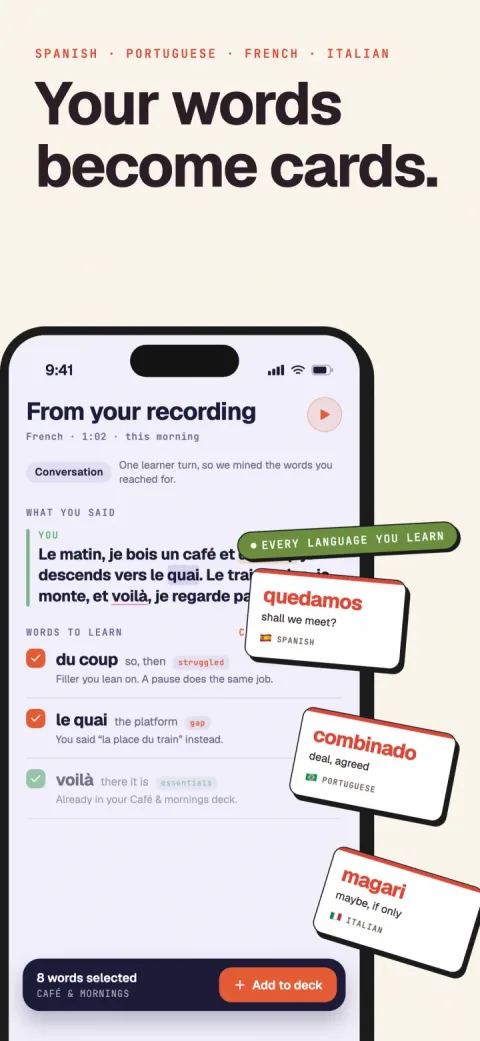
Verbamor turns the words from your own lessons and recordings into flashcards, and brings each one back before you’d forget it.

A language app marks you wrong for an accent because it compares your typed answer with a stored list of accepted answers. Some apps treat é and e as 2 different letters, so cafe fails where café passes.
You have 4 fixes:
- Type the accent mark with a long press on the letter.
- Pick a lenient grading option where the app has one.
- Report the answer when you think it was right.
- Study with self-graded cards, where you type nothing and the app never marks you wrong.
"Accent" can also mean your spoken accent, which speech recognition sometimes rejects. That case has its own section below.
Why does my language app mark me wrong for accents?
Each app decides how close your answer must be to an entry on its list.
Quizlet and Rosetta Stone publish their rules. Anki documents a switch. Duolingo doesn't publish a rule for accent marks or typos.
In 2022, a 2-star App Store review of Duolingo said, "Every little typo means a wrong answer when it used to just be corrected."
The list can also be too short. In 2020, a 1-star App Store review of Babbel said the app "marked my answer wrong because I put dix neuf instead of dix-neuf". That was a hyphen in a number the learner knew.
Synonyms fail the same way. In 2023, a 2-star App Store review of Duolingo described being marked wrong when "I use a different, but just as accurate verb".
In March 2022, Duolingo said learners send about 200,000 reports a day, and 72% say "My answer should have been accepted".
Duolingo also said only about 15% of the "should have been accepted" reports it reviews become new accepted answers.
Do accent marks actually matter?
Sometimes the accent mark is the whole difference between 2 words. In each pair below, dropping the mark gives you a different word:
- Spanish si (if) and sí (yes).
- Spanish el (the) and él (he).
- Spanish papa (potato) and papá (dad).
- Italian e (and) and è (is).
- French ou (or) and où (where).
- Portuguese avó (grandmother) and avô (grandfather).
An app that rejects el for él is doing its job. A reader would see "the" where you meant "he".
Other times a reader still understands cafe. Counting that as a full miss is a strict choice.
Here's a quick test: would the missing mark confuse a reader? If yes, the app is right. If no, you made a spelling slip, and a long press fixes most of those.
What does each app do with a missing accent mark?
Here's what each company publishes, read on 17 October 2026. I've added Verbamor, which I build, in the last row.
| App | Accent marks in a typed answer | What you can change |
|---|---|---|
| Duolingo | Duolingo publishes no rule for accent marks or typos. | Tap the Report flag next to the solution. Many writing exercises also let you speak the answer instead of typing it. |
| Quizlet Learn | A set with a different language on each side defaults to Strict. Strict rejects accent mark errors. | Moderate accepts accent mark errors, but only when both sides of the set share a language. Grading options exist only for English, French, German and Spanish sets of 3 or more cards. Full use of Learn needs Quizlet Plus. |
| Quizlet Write | Write checks your spelling. | Select "Override: I was correct" after a spelling slip. Smart grading is for Quizlet Plus subscribers. |
| Anki | A type-in card compares accent marks by default. | Write type:nc in the card template to ignore accent marks. You still choose the grade yourself. |
| Rosetta Stone | Strict grading counts "every accent and capital letter". | In App settings, set a Typing precision option to Lenient. Lenient grading "accepts minor slip-ups". |
| Babbel | Babbel publishes no rule for accent marks. | Babbel publishes nothing on this. |
| Verbamor | You type nothing in Verbamor, so no accent mark is checked. | You grade each card Forgot, Hard, Good or Easy. |
How do I stop being marked wrong for accent marks?
Type the accent mark on iPhone
- In your app, touch and hold the plain letter, such as e.
- Slide your finger to é.
- Release your finger.
The English keyboard offers other accented letters the same way. Russian needs a Russian keyboard, which Apple lists under Settings, General, Keyboard, Keyboards.
Change the grading in Quizlet Learn
- Open the set.
- Select Learn.
- Select Options.
- Select Grading options.
- Choose Moderate if Quizlet lists it.
- Select Save.
On a Spanish and English set, Moderate won't appear. The override in Write covers that case.
Override a spelling slip in Quizlet Write
- In the Learn options of a set, select Write.
- Type your answer.
- Submit the answer.
- If Quizlet marks a spelling slip wrong, select Override: I was correct.
On the iOS app, the same button reads "I was correct".
Ignore accent marks in Anki
- Open the card template for your type-in note type.
- Find the type field, such as
{{type:Back}}. - Change it to
{{type:nc:Back}}. - Save the template.
Report the answer on Duolingo
- Check your answer.
- Tap the Report flag next to the solution.
- Choose "My answer should have been accepted".
Expect most reports to fail. In 2022, Duolingo said about 15% of the "should have been accepted" reports it reviews become new accepted answers.
Is there a flashcard app that doesn't mark answers wrong?
Yes. A self-graded flashcard shows you the answer, and you judge your own recall. Anki leaves the grade to you, even on a type-in card, and Verbamor works only this way.
In Verbamor you answer in your head, flip the card, and tap Forgot, Hard, Good or Easy. The app never marks an answer wrong, so a typo or a synonym can't cost you a card.
FSRS-6, a spaced repetition scheduler, uses your grade to set the next review date.
The catch is that you now grade accent mark slips yourself. I use the same test as above:
- The mark changes the word (si for sí): tap Forgot. You produced a different word.
- The meaning survives (cafe for café): tap Hard, and check the spelling.
- You had the word and the mark: tap Good or Easy.
The full method is in how to grade yourself honestly on a flashcard. The core rule is to commit to an answer before you flip.
You can also practise out loud. On the recall side of a Verbamor card, tap to hear the example sentence with a tone where the word goes. Then say the missing word.
Cloze audio recall explains why that helps.
Who should keep typed answers?
Self-grading only works if you're honest, and nothing checks your spelling. If you skip an accent mark in your head, nothing catches it.
So if a written exam takes marks for accent marks or spelling, keep a typed drill for the words you misspell. Quizlet Learn on Strict does that job, and so does an Anki type-in card without type:nc.
Verbamor has no typed mode. I'd pair it with a short typed drill of the spellings you keep missing.
What if the app rejects my spoken accent?
Some apps score your speech with speech recognition. A correct word said in a regional or foreign accent can fail that check.
Babbel's help centre, updated 16 October 2026, says recognition "may be less accurate" when your pronunciation "differs significantly from the target phrase".
I couldn't find an accuracy figure for accented speech from any of these 3 apps.
| App | How it checks your voice | What you can change |
|---|---|---|
| Babbel | Speech recognition on speaking exercises, in the app and fully in Chrome on the web. In 2023, Babbel said it trained the AI behind 2 new speech features on different accents, such as Spanish from Argentina, Colombia or Spain. | Tap the microphone icon, usually bottom left, to stop speech recognition in a lesson. |
| Rosetta Stone | TruAccent compares your pronunciation with native speakers' pronunciation. | Set your voice type. Report a phrase with the flag icon. After 3 failed attempts, it offers to disable speech for now. |
| Duolingo | I couldn't find a Duolingo page that says how it scores a spoken answer. | In many writing exercises, you choose whether to type the answer or speak it. |
Set your voice type in Rosetta Stone
- Tap the profile icon in the top right corner.
- Tap App settings.
- Tap the pencil icon next to My voice type.
- Choose Male, Female or Child.
- Tap Confirm.
Your phone's dictation gives you a second opinion. If dictation in that language types the word you said, the app's check is probably too strict.
Verbamor can't help with your spoken accent. It has no pronunciation scoring and no speech recognition on your voice. So it never rejects your accent, and it never coaches it either.
Questions people actually ask
Why does Duolingo mark me wrong for a missing accent?
Duolingo doesn't publish its rule for accent marks or typos. If you think your answer was right, tap the Report flag next to the solution. In a 2022 post, Duolingo said about 15% of the "should have been accepted" reports it reviews become new accepted answers.
Can Quizlet ignore accent marks?
Quizlet Learn's Moderate grading option accepts accent mark errors, but only when both sides of a set share a language. A set with 2 languages defaults to Strict. In Write mode, select Override: I was correct after a spelling slip, and Quizlet marks the answer correct.
Do accent marks matter in Spanish?
Spanish accent marks matter when they change the word, as in si (if) and sí (yes), or papa (potato) and papá (dad). A missing mark on café doesn't change the meaning. But a teacher or an exam may still count it as a spelling error.
Is there a flashcard app where nothing is typed?
Self-graded flashcard apps show you the answer and let you grade your own recall. In Anki, you type only if your card template asks for it. Verbamor has no typing, so nothing checks your spelling, and you grade each card Forgot, Hard, Good or Easy.
Why does a language app reject my spoken accent?
Speech recognition compares your audio with the sounds it expects. Babbel says it's less accurate when your pronunciation differs a lot from the target phrase. Tap Babbel's microphone icon to stop it in a lesson, or set your voice type in Rosetta Stone.
Sources
Quizlet's grading rules
- Quizlet Help Center. Using grading options. Updated 20 Sep 2026, read 17 Oct 2026. Relaxed, Moderate and Strict, and which sets get each.
- Quizlet Help Center. Studying with Write mode. Updated 12 Oct 2026, read 17 Oct 2026. How to open Write, the "Override: I was correct" button and smart grading.
Anki's type-in cards
- Anki Manual. Field replacements, sections "Checking your answer" and "Ignoring diacritics". Read 17 Oct 2026.
- Anki Manual. Studying, on grading your own answers. Read 17 Oct 2026.
Duolingo's reports and speaking
- Mockler, R. (29 Mar 2022). How user reports improve course content. Duolingo Blog. Read 17 Oct 2026.
- Duolingo Blog (9 Feb 2026). How Duolingo teaches speaking skills. Read 17 Oct 2026. Speaking an answer instead of typing it.
Rosetta Stone's typing and speech settings
- Rosetta Stone Support (28 Jul 2026). Profile and settings. Read 17 Oct 2026. Typing precision, voice type and TruAccent.
- Rosetta Stone Support (14 Jan 2026). Troubleshooting speaking activities. Read 17 Oct 2026. The flag icon and switching speech off.
Babbel's spelling and speech checks
- Babbel Support. Speech recognition. Updated 16 Oct 2026, read 17 Oct 2026.
- Babbel press release (21 Nov 2023). Learn with your own voice. Read 17 Oct 2026. How the speech model was trained.
Typing accent marks on iPhone
- Apple Support. Type with the onscreen keyboard on iPhone, section on accents and special characters. Read 17 Oct 2026.
- Apple Support. Add or change keyboards on iPhone. Read 17 Oct 2026.
Grade your own recall, with nothing to type.
Verbamor's cards are self-graded. You answer in your head, flip the card, and tap Forgot, Hard, Good or Easy. FSRS-6 then schedules the next review.
Start 7 days freeThe 7-day free trial is on the yearly plan.