 Verbamor
Your first 10 minutes in Verbamor
Most people download a language app, tap through the setup, and then stare at an empty screen wondering what to do next. Verbamor has a specific answer that takes about ten minutes: answer a few questions, feed it one piece of real audio, then study the cards it builds from that audio.
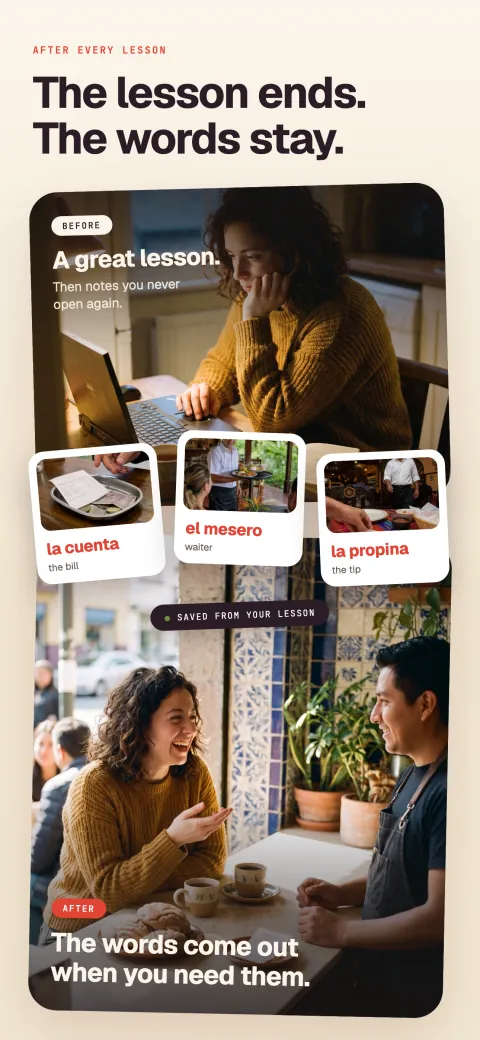
Verbamor records your lesson and turns what your tutor taught into cards that come back on schedule.

Most people download a language app, tap through the setup, and then sit looking at an empty screen wondering what they're supposed to do. Verbamor has a specific answer, and it takes about 10 minutes.
You answer some questions, you feed it one piece of real audio, and you study the cards it builds from that audio. Here's exactly what happens at each step, what it costs, and how to get out if you decide against it.
Minutes 0 to 4: four of the questions change what the app does
The app opens on a set of one-question screens. There are 17 of them that you actually answer, and most auto-advance the moment you tap, so it moves faster than the number suggests.
Four of the answers change what the app does afterward:
- Which language. Spanish, French, Italian, Portuguese, Russian or German. Those six are all it teaches an English speaker. If you want Japanese, Korean or Mandarin, stop here, this is not your app.
- What you struggle with. You pick one: you forget things, you cannot produce words when speaking, you freeze mid-sentence, you have plateaued, your notes go unread, or nothing sticks. Your answer routes the next screen to a specific explanation of that failure. It also tells the app what to lean on later.
- Where your language comes from. A tutor, a class, a conversation partner, podcasts, shows. This is the question that matters most, because the app is built to catch language you already meet somewhere else.
- Your level. Beginner through advanced. This sets how hard the example sentences on your cards come out.
The app's own interface stays in English at every step when you learn from English. Every button, label and setting stays readable, while the language you're learning stays on the cards, where you have to work for it. (Spanish and Portuguese speakers learning English get the whole app in their own language.)
At the end you make an account. The account exists so your cards survive a new phone, and so the review history that drives your scheduling is stored somewhere other than the device in your hand.
Two things the questions don't do. They don't place you on a course, because there's no course, no unit 1, no path to walk down. And they don't test you.
Nothing in the first four minutes grades you or estimates your vocabulary size. The app has no content of its own to hand you, so it doesn't need to know where you'd slot into it.
Minutes 4 to 7: feed it one real thing
This is the step people skip, and skipping it is why the app sits empty. Go to the Record tab. There are three ways in, and all three end in the same place.
Record live. Tap the record button during a lesson, a conversation, or while you listen to something. One capture can run up to 90 minutes, so a full tutor session fits inside a single recording with room left over.
Import audio. Tap Import audio and pick a file already on your phone: a lesson your tutor sent you, a downloaded podcast episode, a voice memo from a conversation.
Paste text. Tap Paste text and paste a chat transcript, a page of lesson notes, or a paragraph you read somewhere. No audio needed.
Whichever way you go in, the app transcribes what you gave it and reads through the transcript for vocabulary. It pulls out single words and multi-word phrases, so tener ganas de comes back as one item instead of three unrelated words. Then it hands you a list, and you choose.
Choose few. Ten to fifteen items from a first session is plenty. The list will be longer than that, and the urge is to take everything.
Everything is how you end up with 200 cards due on a Tuesday and no appetite to open the app. The cards you didn't take aren't lost. The words are still in your life, and they'll come back the next time you record.
If you have no audio right now: open a podcast episode in your language, play 3 minutes of it out loud, and record that.
It's a worse source than your own lesson, but it gets the pipeline moving today. The point of the first 10 minutes is to see the machine work end to end.
Minutes 7 to 10: study the cards you just made
Each item you kept becomes a card with four parts: an example sentence using the word, an image, and two separate recordings of that sentence.
One recording has the answer word replaced by a tone, so you hear the sentence with a hole where your word goes. The other is the complete read, with the word spoken.
Card building runs in the background. The text arrives first, then the image and audio. Go to the Study tab and start. Some cards may still be finishing their images, and those are studyable anyway.
The front of a card asks you to produce the missing word. Say it out loud before you flip.
This is the part that decides whether the whole system works. Saying a word out loud commits you to an answer, and a spoken guess can't be quietly upgraded once you see the correct one.
Karpicke and Blunt tested this against the best version of studying in Science in 2011. Students read science texts and either practiced recalling them or built concept maps of them, which is careful, effortful, elaborative study. (A concept map is a diagram linking the ideas in a text.)
On a test a week later, the students who practiced recall did better. They did better on questions about the text and on questions requiring an inference. They did better even when the final test was building a concept map.
Producing beats reviewing, and only producing counts.
Then you grade yourself on four buttons: Again, Hard, Good, Easy. The honest mapping is short. If the word arrived only after you flipped the card, that's Again, including when you knew it the instant you saw it.
Recognizing a word is a different skill from producing one. Grading recognition as a pass tells the scheduler you own a word you don't own.
Those grades feed FSRS, a scheduling algorithm that fits a memory model to each individual card from your own review history and picks a next review date from it. Grade generously and it schedules a word for 3 weeks that you'll lose in 5 days.
FSRS is the same algorithm family serious Anki users run, though in Anki you have to turn it on yourself. Anki ships the older SM-2 by default, and FSRS sits behind a setting in the deck options page.
Ten cards takes about 3 minutes on the first pass. Tomorrow you'll see the ones you graded Again plus a few others, and the day after that fewer still.
A first week from a single recording usually settles into 3 to 6 minutes a day. That's the real shape of the commitment, and it's worth knowing before you decide whether the price is fair.
There’s no free tier, and only the annual plan has a trial
Two plans, and no free tier. There's no free version of this app, and nothing here is ad-supported.
- Explorer: US$19.99, billed monthly. No trial.
- Native: US$129.99, billed once a year. That works out to about $10.83 a month. This is the only plan with the 7-day free trial.
The trial is on the annual plan only. Apple's own rule is that your subscription starts immediately and you're not billed until the trial period ends.
At that point, you're charged the full price automatically unless you cancel first.
During those 7 days you get the whole app. Recording, importing, transcription, card generation, the study queue, Translate, Library, all of it. There's no locked tier and no feature that turns on later.
The honest read on the price: US$19.99 a month only makes sense if you already have a source of real language in your week.
Say you have no tutor, no class, no conversation partner and no habit of listening to anything. Then the app has nothing to mine. Past its starter deck of about 650 common words, you'll be paying for a flashcard system you fill by hand. Fix the input first, then come back.
How to cancel, in four taps
Apple handles the billing and Apple handles the cancelling, so the whole process happens in iOS Settings, outside the app. Apple's steps on an iPhone, from its support page: open Settings, tap your name, tap Subscriptions, tap the subscription, tap Cancel Subscription. You may have to scroll to find the Cancel Subscription button.
One number matters more than the steps. Apple says that if you signed up for a free trial and don't want to renew it, cancel at least 24 hours before the trial ends.
Set a phone reminder for day 6 the moment you start the trial. Do that now, before you forget. A trial you meant to cancel on day 7 is the most common way people pay for something by accident.
Cancelling stops the renewal. You keep access for the period you already paid for.
Do this one thing before you close the app
Pick your source for the week and put it in the calendar. I mean the source itself: a tutor session on Thursday, a 10-minute podcast on the train Monday and Wednesday, a call with the friend who speaks Italian. Then record it.
The app is a machine for turning language you already meet into language you can produce. With one source a week, it works.
With no source, it's an empty box with a subscription attached, and no amount of tapping around inside it will change that.
So: open Record, feed it 3 minutes of something real, keep 10 items, and study them before you put the phone down. If the first review session feels a bit hard, that's the correct feeling.
You're being asked to produce words instead of recognize them, and that's the whole difference.
Ten minutes, one real recording, real cards.
Verbamor turns three minutes of an actual lesson or conversation into a study queue with example sentences, images, and native audio built in, so the first ten minutes already show you what the app is for.
Start 7 days freeThe 7-day free trial is on the yearly plan.