 Verbamor
iOS 16.4, an iPhone 8 or later, and about 100 MB for 500 cards
Verbamor needs iOS 16.4 or later, which the iPhone 8 and everything after it can run. The app itself downloads at 53.4 MB, and a 500-card deck adds roughly 100 MB more once you switch on offline downloads. The only two permission prompts, microphone and speech recognition, appear when you first press record.
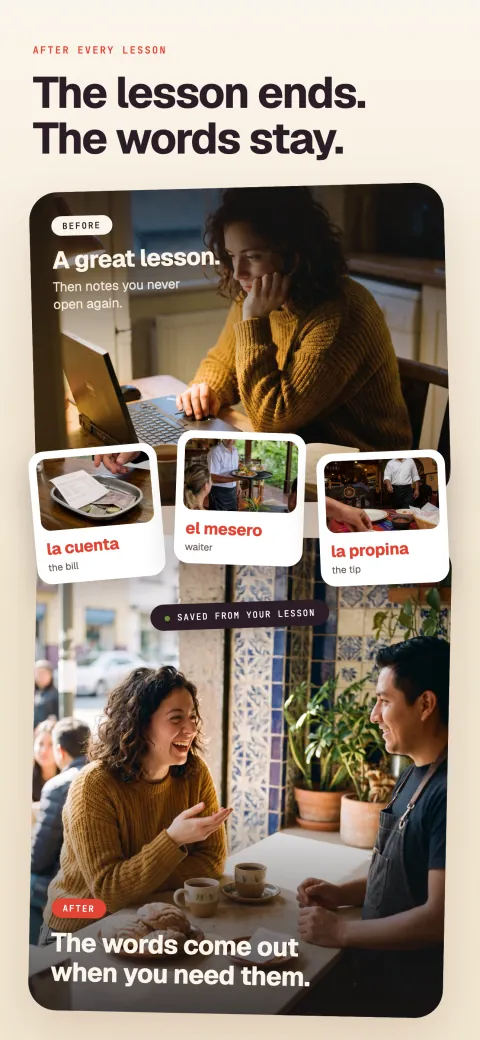
Verbamor records your lesson and turns what your tutor taught into cards that come back on schedule.

Verbamor needs iOS 16.4 or newer. The oldest iPhone that reaches iOS 16.4 is the iPhone 8, released in 2017. The App Store listing puts the download at 53.4 MB.
If your phone is an iPhone 8 or later on current software, it runs the app.
Two other things catch people out. One is what a deck actually costs in storage. The other is the two permission prompts you'll see the first time you record.
A deck of 500 cards holds roughly 100 MB of audio and images on the phone once you switch offline downloads on.
The floor is iOS 16.4, and the iPhone 8 is the oldest phone that reaches it
Verbamor's minimum is iOS 16.4, not 16.0. The App Store enforces it, so a phone below 16.4 won't offer you the download at all.
Check yours now: Settings, then General, then About. The line reads "iOS Version".
Apple's iOS 16 and iPadOS 16 compatibility list names the iPhone 8 and iPhone 8 Plus as the oldest supported models. Everything after those is on the list: iPhone X, XR, XS, 11, 12, 13, 14 and later, plus the iPhone SE 2nd generation and 3rd generation.
Two named devices that don't qualify, so you can stop checking:
- iPhone 7 and 7 Plus. These stopped at iOS 15.8.5. There is no update path to 16.4.
- iPhone 6s, 6s Plus, and the original iPhone SE from 2016. Same position, stuck on iOS 15.
If you hold an iPhone 8 or later still running iOS 15, the update is free: Settings, General, Software Update. Do that first.
A finished card takes 200 to 220 kilobytes, so 500 of them take about 100 megabytes
The Verbamor app itself is 53.4 MB, from the App Store listing. That's the floor, and it stays roughly flat.
Cards consume the rest of the storage, and only if you ask them to. Each card carries four files: one image and three audio clips.
The image is a 720 pixel WebP (a compressed image format) at quality 75, which lands between 30 and 50 KB. Audio carries the weight.
In July 2026 the app gained a second recording of every example sentence. The backfill ran across every card in the database at that date: 2,744 cards, split 763 Spanish, 675 Portuguese, 657 French and 649 Italian.
It produced 2,744 clips totalling about 205 MB. That's every card, so it's a census and not a sample, and it divides to roughly 76 KB per sentence clip.
Each card holds two of those: one with the answer replaced by a tone for recall, one read complete.
The fourth file on each card is a clip of the word alone. All three clips come from the same text-to-speech model at the same MP3 settings, so size tracks duration.
A single word runs about a fifth as long as the sentence carrying it. That puts the word clip near 15 KB. It's the one figure here I derived instead of counting, so treat it as the softest of the four.
The four card files sum to between 197 and 217 KB. Call a finished card 200 to 220 KB:
- 200 cards: about 39 to 43 MB.
- 500 cards: about 99 to 108 MB.
- 1,000 cards: about 197 to 217 MB.
All three deck figures are ceilings. Unless you turn on the whole-deck download, the app caches audio only for the session you're reviewing. So the cost stays near the 53.4 MB app plus recent reviews.
The whole-deck download setting is in the Today tab under Study, labelled "Download my deck over WiFi". Drop to cellular mid-download and it pauses, and whatever already saved stays playable.
A 500 card deck moves about 100 MB as roughly 2,000 small files, four at a time. So the per-file round trip sets the pace, more than your line speed does.
The FCC's Internet Access Services report found that about 75% of US residential fixed connections ran at least 100 Mbps downstream as of June 2025. At that floor, 100 MB of continuous data takes under ten seconds.
Expect a few minutes. Start it the evening before a flight, well before you're at the gate. It resumes on its own next time you're on WiFi.
There's no in-app button that clears downloaded audio and images. The files live in the operating system's cache folder, so iOS deletes them when the phone runs short of space.
The app also caps its own audio folder at 200 MB, dropping the least recently played clips at that point.
To reclaim the space on demand, delete the app and install it again. That costs nothing beyond the re-download, because your cards live on the server.
One caveat: the per-card sizes are corpus averages, and your cards vary with sentence length. A deck of long phrases runs above the range and a deck of short nouns below it. Plan with 200 to 220 KB per card, and treat any single card as unpredictable.
Both prompts arrive on your first recording, and denying speech is the confusing one
You'll see exactly two permission prompts, and neither appears until you do the thing that needs it.
Microphone. The microphone prompt appears the first time you press record. The wording iOS shows comes from the app: "Verbamor uses your microphone to transcribe the language you're practicing out loud." Tap Allow.
Tap Don't Allow and recording stops working, and iOS won't ask a second time. That's an iOS rule, and the app can't change it.
The app detects the blocked state and puts an Open Settings button on the screen. You can also go directly: Settings, Verbamor, Microphone.
Everything except live recording still works with the microphone denied. Import an audio file, paste text, review cards, use Translate.
Speech recognition. The speech recognition prompt appears alongside the microphone prompt on your first recording, and it covers turning what was said into text. Grant both together.
Deny speech recognition while allowing the microphone and you get the more confusing failure of the two. Recording still captures and the file still saves. What you never get is the transcript, so nothing becomes a card.
Reverse it at Settings, Verbamor, Speech Recognition. Recordings you already captured then transcribe on the next attempt. So a denial costs you the wait, and you keep the audio.
Notifications are separate and optional, with one exception. Start the 7-day trial, which only the yearly plan has, and Apple sends a reminder before it converts to a paid year. Deny notifications and your only reminder is the alarm you set yourself.
There is no location prompt, no contacts prompt, no tracking prompt. Photo and camera prompts appear only if you put your own picture on a card.
Does Verbamor work offline?
Partly: study and record work offline, and transcription and Translate don't. Offline behaviour matters more than storage if you commute underground.
- Study. Works offline. Ratings write to local storage immediately, so the app never waits on the network to advance a card. Audio plays offline only for cards already downloaded.
- Record. Records offline, transcribes online. The capture is local, so you can record in a basement with no signal and the file is safe. Nothing becomes a card until you have a connection.
- Translate. Needs a connection. It calls a server every time, and offline it gives you a retry button instead of a result.
- Library. Card text is available offline. Images and audio appear for cards already cached.
Grades queue on the device and upload when you reconnect. There's no cap on that queue and no point at which it discards your work.
Each review appends one small row of numbers to a list in the phone's own storage. So 300 cards on a transatlantic flight queue exactly the way 3 do. Land, reconnect, and the queue drains in the background.
The pattern: anything that reads what you already have works offline, and anything that creates something new needs the network.
iPad runs it unchanged; there is no Android, web or Mac version
Verbamor runs on iPad too. It's a universal app, so the same iOS 16.4 floor applies there. Everything in this post carries over unchanged: the storage math, the permission prompts, the offline behaviour.
There's no Android build. Nothing in the Play Store. If your phone is a Pixel or a Galaxy, this app is unavailable to you today.
There's no web version and no Mac app.
Headphones. Not required. The phone speaker plays card audio fine and the built-in microphone records lessons fine. AirPods are usually worse for recording a second person, because they sit close to your own mouth and far from your tutor.
An external microphone. Not required, and mostly wasted money. The app captures at 16 kHz mono, the rate speech transcription runs at. So a studio microphone gets downsampled to what the iPhone already delivers.
Placement beats hardware: put the phone between you and whoever is talking.
A tutor, right now. You need spoken language from somewhere. A podcast, a YouTube video played out loud, or a voice note from a friend all work.
The iPhone SE 2nd generation qualifies, and battery is its weak point
Take the cheapest device that qualifies, because this is the phone people ask about.
The iPhone SE 2nd generation launched in 2020 with an A13 chip. It's on Apple's iOS 16 list and it runs iOS 18, so it clears the 16.4 minimum with several versions spare. It qualifies.
The A13 handles the app without difficulty, because the heavy work happens on servers: transcription, card text, images and audio are all generated remotely. The SE is holding a recording and playing MP3 files.
The SE's real constraints are screen and battery. The SE has a 4.7 inch display, the smallest screen the app runs on, and card images render small on it. Workable, but tighter than an iPhone 14.
Storage is the one number to check on a 64 GB phone. Open Settings, General, iPhone Storage, and read the free figure at the top. Under 1 GB free, leave the deck download off and let the app cache only what you review. Above that, the 155 MB for app plus a 500 card deck disappears into the noise.
Battery is the honest weak point. I haven't measured the drain on an SE, so I won't give you a percentage I made up.
The mechanism is what you can plan around. Recording holds the microphone open for the entire session, whether the screen is on or off. So a 60 minute lesson keeps hardware running a full 60 minutes.
On a 2020 phone still carrying its original battery, plug in for anything past 30 minutes.
Skip it for a sixth language, or if your time is cheaper than the subscription
Two situations, stated before you spend anything.
You're learning a language outside Spanish, French, Italian, Portuguese and Russian. Those five are the whole list, and the app's own menus are always in English.
You want a cheaper tool and your time is cheap. Anki costs nothing on a computer or an Android phone, and US$24.99 once on iOS, with no subscription.
It runs the same scheduler family. Anki ships SM-2, an older scheduling formula, by default. Its manual says to "Enable FSRS under the FSRS section", which sits at the foot of the deck options page. (FSRS is an open-source algorithm that predicts when you're about to forget each card.)
Anki's cost is that you write every card yourself, and that cost deserves a number. Matching what Verbamor builds takes four pieces per card.
You need a sentence you write, an image you find and crop, a recording of that sentence, and a second recording with the target word cut out.
Finding and cropping one usable image runs a minute or two by itself. Cutting two clean audio clips takes several more. Five to ten minutes per card is fair once you're practised.
At the fast end, 200 cards is over 16 hours of work. Anki is free and your evenings aren't. If that trade suits you, use Anki.
Open Settings, then General, then About, and read the iOS Version line. If it says 16.4 or higher, download the app and start the trial today.
Your iPhone probably already qualifies.
Verbamor sends the heavy work, transcription, card writing, audio and images, off to its own servers, so even an older iPhone that clears the iOS 16.4 bar runs it without strain.
Start 7 days freeThe 7-day free trial is on the yearly plan.