 Verbamor
Moving off Anki without losing the decks you built
Few people quit Anki because of the scheduler. They quit because making the cards became a second job. Here's what leaving actually costs, in full.
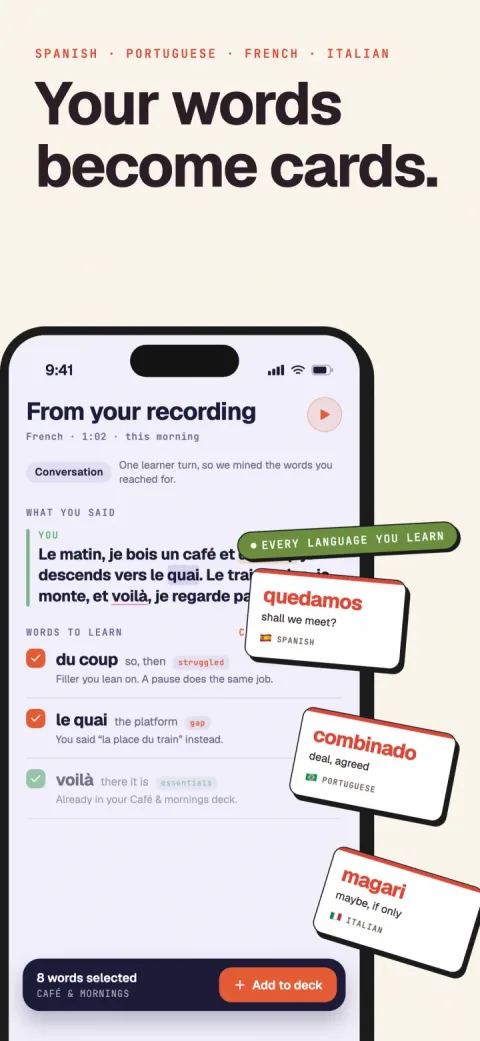
Verbamor turns the words from your own lessons and recordings into flashcards, and brings each one back before you’d forget it.

You open Anki. 40 due. You do 6 of them, and the count doesn't visibly move, so you close it.
Somewhere in there is a note type you spent an entire evening on. Three fields, a conditional template, a bit of CSS you copied from a forum post in 2023 and never dared touch since. It works. You just don't add to it anymore.
That's the actual shape of quitting Anki: a slow stop, with no decision in it.
So here's the answer to the question you came with, before any of the argument. Your review history doesn't come with you, to Verbamor or to anything else, because scheduling state lives in each app's private format.
Don't attempt a mass import. Be suspicious of any app that promises one.
Run both apps in parallel for two or three weeks, and hand-rebuild only your highest-lapse 20 or 30 cards.
The rest of this is why that move is worth making at all, and what it costs you.
People quit Anki when the deck stops growing
When people write about leaving Anki, they usually go after the algorithm. Old scheduler, SuperMemo 2, cards coming back too often or not often enough.
Anki ships the modern scheduler. The manual is plain about it: "The Free Spaced Repetition Scheduler (FSRS) is an alternative to Anki's legacy SuperMemo 2 (SM-2) algorithm". FSRS predicts when you're about to forget each card, and you turn it on under the FSRS section at the bottom of deck options.
It's opt-in and off by default, which is worth knowing. But it's one toggle and it's free.
So if you switch apps chasing a better scheduler, you'll get a scheduler roughly as good as the one you already had. FSRS is the same algorithm family everywhere it ships.
What people abandon is the input side. The deck stopped growing weeks before it stopped being reviewed.
And once a deck stops growing, it becomes a museum of what you cared about last spring.
The deck stops growing long before it stops being reviewed. By the time you quit, you're just maintaining an exhibit.
Building the deck costs more time than reviewing it
Migaku's own guide to making Anki cards does the arithmetic against its own interest. For a 1,500-card deck: "If you spend 30 seconds per card (Typing front, back, maybe adding an image), that's 750 minutes or about 12.5 hours."
12.5 hours. That's a company selling an Anki workflow telling you what the workflow costs before you review a single card.
Now set that against the reviewing. The same page puts a fresh card at "10-15 seconds, including thinking time and rating difficulty."
Divide one Migaku figure by the other (my arithmetic, not something Migaku says). Making a card runs two to three times the length of the first review of it. That ratio holds every single time you sit down to add material.
And that 30 seconds assumes a clean source. A word list, a subtitle file, a page you can copy.
A tutor lesson gives you 50 minutes of speech instead, half of it yours, with maybe 15 words in it you couldn't produce.
To card those you have to remember they happened, look each one up, decide on a sentence, and type it, all several hours after the fact.
I won't guess at what that does to the 30 seconds. What I can tell you is the size of the haystack, because we measured it. One real 88-minute two-speaker lesson came back from transcription at 74,187 characters.
That's the thing you're supposed to sit down and mine by memory on a Tuesday night.
And so the job gets postponed until it's stale, and the deck stops growing.
Leaving costs you add-ons, free sync and money
Every "switch from Anki" post I read while writing this had the same tell. It's a two-column table where everything good sits in "keep" and everything annoying sits in "change." The migration comes out free, because it was built to.
It isn't free. Here's the bill.
The add-ons. Anki publishes an open add-on index, and the manual sends you straight to it: "To browse the list of available add-ons, select Tools > Add-ons, then click on Get Add-ons." Heatmaps, image occlusion, dictionary hooks, whatever weird thing you found that fixes your specific weird thing.
Move to any closed app and you get exactly the features that app's author decided to build. If you're running four add-ons, you're going to feel all four go.
You also give up free sync. AnkiWeb has moved your collection between machines for nothing, for years, and that's an unusual thing to have. You notice it about a month after you start paying somebody a monthly fee for the same convenience.
The price. This one is brutal to us and I'd rather print it than have you find it later. Anki's desktop version is free on all major platforms, and AnkiDroid on Android is free too.
The only paid door is iOS: AnkiMobile is $24.99, one time. Verbamor is $19.99 a month, or $129.99 a year, with no free tier at all.
On a five-year horizon Anki costs a rounding error and we cost several hundred dollars. There's no version of that comparison where we win on money.
The exit. The manual documents the way out as plainly as the way in: "Exporting allows you to save part of your collection as a text file or packaged Anki deck." Your own notes, on your own disk, whenever you want them.
That's why walking out of Anki is possible at all, and it's the thing you're trading away.
Leave over two or three weeks, and rebuild only the stubborn cards
Back to the history, now that you know what it's made of. An .apkg (Anki's deck file) carries cards, note types and media, and is rarely readable outside Anki. A plain text export carries fields and nothing else.
Either way the intervals stay behind, because an interval that means something to FSRS in Anki means nothing to another app's model of you.
Which sounds worse than it is, because the learning was never in the file.
And it's why a mass import is the wrong thing to want. A lossy import of 2,000 cards gets you 2,000 cards presented as brand new, which is a worse first week than starting empty.
Do this instead, and give it two or three weeks rather than an evening:
- Keep reviewing in Anki. Stop adding to it. Your mature cards have long intervals, so the daily count falls on its own. You don't quit anything; you just stop feeding it.
- Put the new app on the same trigger. Whatever already makes you open Anki, the coffee or the train, attach the new session to that. A new habit at a new time of day is two changes, and two changes is one too many.
- Rebuild by hand, and only the stubborn ones. Sort your Anki deck by lapses, take the top 20 or 30, and type those fresh. Sorting by lapses is the whole trick: it hands you the words your own past year of grades already flagged, instead of the ones you happen to remember resenting. That's 15 minutes, and typing them yourself sets you up to grade them honestly from the first review.
- Let everything else go. Everything you pass in under a second is done. Those cards can stay behind.
- Delete nothing for a month. Export a backup and keep the app installed. A migration you can reverse is one you'll actually finish.
One thing worth watching during the overlap: two review sessions means the combined daily load is the highest it will ever be.
If that tips you over your limit, cut the new app's new-card setting instead of skipping the Anki queue, because the draining queue is the part with a deadline. The daily count you can sustain is a real ceiling, and week two is when people crash into it.
Around week two the Anki count hits 4 or 5 a day, you skip a morning, and the move is done. No ceremony.
Most people should stay and turn on FSRS
I built Verbamor for one specific version of this problem. You have a tutor, the lesson generates 10 or 15 words you couldn't produce, and those words evaporate before Thursday.
You record or type what came up, and it builds the fill-in-the-blank cards with native-accent audio and an image, then schedules them with FSRS. Five languages: Spanish, French, Italian, Portuguese and Russian. iPhone and iPad only.
No free tier, and no Anki import at all, not even a lossy one: your own deck starts empty and refills from your next lesson, next to the Essentials deck of about 650 common words. Those 74,187 characters go in whole and come back as a list capped at 60 words and 30 phrases, which you check off instead of typing out.
Cards are also a shared cache across everyone using the app. Any word another learner already saved comes back with no generation at all. That's why a beginner's first Spanish session is mostly instant and a Russian one mostly isn't.
What I still owe you is the other half of Migaku's arithmetic, and I don't have it. There's no measured capture time I can put next to their 30 seconds, and I'm not going to invent one to sit beside a figure a competitor actually published. Hold me to a real number when I have one.
Which means a lot of people reading this should close the tab and go turn on FSRS instead.
Stay if you're on Android. AnkiDroid is free and we don't exist on your phone.
Stay if your source material is a file. Textbook chapters, a frequency list, subtitles, a novel you're mining: that's what Anki plus a good add-on chain is for. It'll beat anything I could build for that job.
Money should probably decide it too. $24.99 once against $129.99 a year isn't a close call, and a free deck you review beats a paid one you resent.
And if pasting from a dictionary add-on takes you 20 seconds and doesn't bother you, then the labour argument above simply isn't about you. Everything else about Anki is better.
The switch is worth it in one case, really. Your source is a conversation, no one can hand you a file of it, and the typing is what's been killing you for months.
Sources
Anki ships FSRS, as an option
- Anki Manual. Deck Options: FSRS. "The Free Spaced Repetition Scheduler (FSRS) is an alternative to Anki's legacy SuperMemo 2 (SM-2) algorithm." Enabling it also hides the SM-2 specific options such as Graduating interval and Easy bonus. Read 22 Aug 2026.
- Anki Manual. Add-ons. "To browse the list of available add-ons, select Tools > Add-ons, then click on Get Add-ons. Alternatively, open ankiweb.net/shared/addons in a web browser." Read 22 Aug 2026.
- Anki Manual. Exporting. "Exporting allows you to save part of your collection as a text file or packaged Anki deck." Notes in plain text are written one field per tab. Read 22 Aug 2026.
What card-building costs
- Migaku. How to Make Anki Cards. "If you spend 30 seconds per card (Typing front, back, maybe adding an image), that's 750 minutes or about 12.5 hours" for 1,500 cards, and "each card might take 10-15 seconds" to review when new. Read 22 Aug 2026.
How big a lesson actually is
- Verbamor engineering notes,
analyze-transcript. A measured 88-minute two-speaker lesson transcribes to 74,187 characters without speaker labels, and 69,407 with them. Extraction is capped at 60 words and 30 phrases per recording after dedupe. Our own measurement, not a third party's, and the ceiling it was used to set is in the shipped code. Read 22 Aug 2026.
What Anki costs
- AnkiWeb. Anki downloads. "The free computer version is available for all major platforms" and "AnkiDroid for Android is free and developed by contributors." Read 22 Aug 2026.
- Apple App Store. AnkiMobile Flashcards. $24.99, one time. Read 22 Aug 2026.
The cards you never got around to making.
Verbamor takes the words from your own lesson and builds the cards, so the 12.5 hours of typing isn't standing between you and a deck.
Start 7 days freeThe 7-day free trial is on the yearly plan.